
.webp)
For decades, storm response scheduling has relied on phone calls, spreadsheets, whiteboards, and late-night email chains. That approach worked when storms were smaller, crews were local, and regulatory scrutiny was lighter.
That world no longer exists.
Today’s storm events are larger, fast-moving, and more expensive. Compliance requirements are stricter. And customers expect restoration updates in real time.
This is where the gap between traditional scheduling and modern roster apps becomes impossible to ignore.
Most utilities don’t intentionally choose outdated scheduling methods. They either follow what’s already been used in their organizations or rely on stopgap tools that were never designed for storm response. But during storm response, those methods fail in predictable ways.
Here are the reasons.
Storm response schedules change by the hour. Crews get reassigned. Access roads close. Damage assessments shift priorities. When scheduling lives in spreadsheets or phone trees, the updates lag behind. Crews arrive at the wrong locations and supervisors waste hours reconciling conflicting information.
What starts as a coordination issue quickly becomes a restoration delay!
Calling contractors one by one to confirm availability works when you have a small team to handle. But when you have to manage hundreds of linemen, multiple contractors across several states, with 24/7 rotating shifts, everything seems to fall apart.
By the time availability is confirmed, it’s already too late. This roster building delay alone can add hours to restoration timelines.
During storm response, utilities must verify OSHA and NFPA credentials, CDL and medical card validity, Union and labor rules, Rest periods and fatigue limits. With traditional scheduling, these checks are made either manually, or they’re skipped completely due to pressure and time constraints.
That creates risks:
Storm managers need to always know who is on the ground, who is available, who is cleared to work, and where crews are deployed. Traditional tools don’t provide a live operational picture. Decisions get made on partial information. And hence, mistakes follow.
Read more: Balancing Tradition and Technology in Storm Response: A Practical Framework for Utilities
Many utilities try to adapt generic workforce tools for storm response. The result is usually frustration.
General tools often lack:
Storm response isn’t a normal shift problem. It’s an emergency operations problem.
A roster app is a workforce management tool that schedules crews, tracks availability, and updates assignments in real time. It helps organizations coordinate crew quickly and accurately, especially during emergencies like storm responses.
A roster app is not just a digital calendar. For storm response teams, the best roster apps act as a real-time command layer for workforce coordination.
Instead of reacting manually, utilities can
General workforce scheduling tools aren’t built for emergency response. Storm events require storm response management software specialized functionality.
With a storm-ready roster app:
Instead of waiting hours to confirm manpower, utilities can deploy crews in minutes.
Crews don’t rely on secondhand updates or outdated instructions. Supervisors aren’t stuck relaying information manually.
Modern roster apps push:
Everyone works from the same source of truth.
Specialized or AI validated storm roster software automatically checks:
If something is missing, the system flags it before crews are dispatched and not after a violation occurs. This protects workers, utilities, and public trust.
Storm zones don’t guarantee connectivity. The best roster apps work offline, allowing crews to:
Data syncs automatically once connectivity returns. There are no lost information, and no manual re-entries are needed.
Storm response leaders can see active crews, available resources, the tasks that are open, and the pending works with its bottlenecks. This visibility enables faster, more confident decisions, and reduces chaos in storm rooms.
Utilities using specialized storm response software consistently report faster crew mobilization and reduced overtime waste. They have fewer compliance issues, better contractor coordination, and extremely shorter restoration timelines.
More importantly, they regain control during high-pressure events.
KYRO AI StormShield was built specifically for fast-moving teams working in storm response. It was not retrofitted from office scheduling software. It was designed from the ground up for field conditions, rapid changes, and high-risk operations where speed, accuracy, and coordination matter.
By bringing messaging, forms, rostering, vetting, and document management into a single platform, StormShield removes redundant data entry, cuts manual steps, and eliminates the delays that slow down mobilization.
Here’s what makes StormShield different.
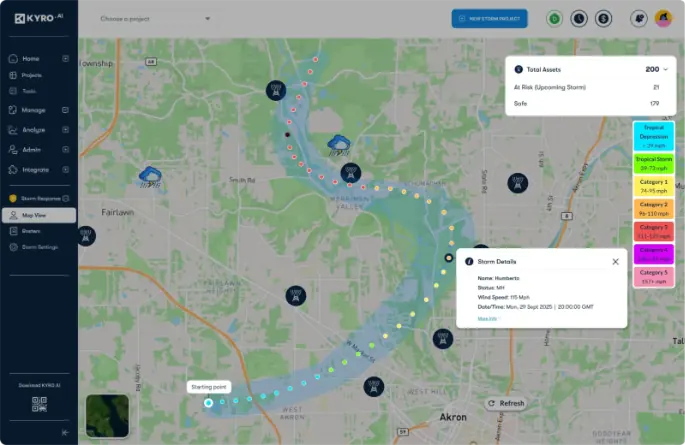
StormShield integrates live GIS maps showing:
Dispatchers don’t just assign crews. They assign the closest, qualified crews based on real conditions.
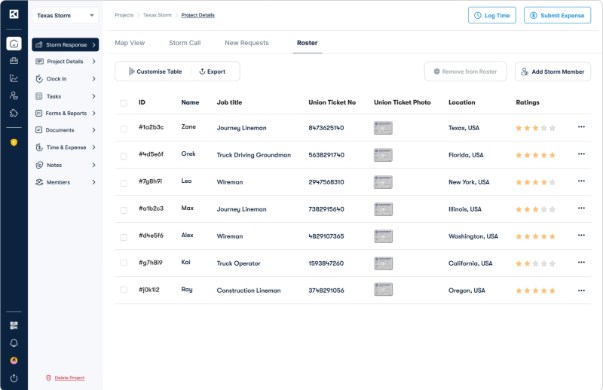
Utilities and contractors operate from the same system. StormShield allows:
What used to take hours of phone calls now happens in minutes.
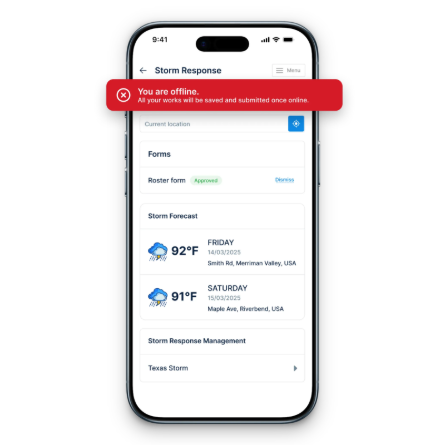
Crews can:
even without network access. Once online, everything syncs automatically.
StormShield verifies:
Before work begins.
StormShield includes an AI co-pilot that helps managers:
This reduces decision fatigue during long storm events.
Storm response today is too complex, too regulated, and too fast-moving for traditional scheduling methods.
Roster apps, especially those built specifically for storm response, aren’t just a nice-to-have anymore. They’re the core infrastructure and the crux of the ops.
If your teams are still relying on spreadsheets and phone calls during major events, the risk isn’t just inefficiency. It’s delayed restoration, safety exposure, and lost trust.
Ready to See StormShield in Action?
If you’re evaluating the best roster apps for storm response teams, KYRO AI StormShield should be your go-to solution, as it’s built for exactly this moment.
👉 Explore StormShield
👉 Request a demo

For decades, storm response scheduling has relied on phone calls, spreadsheets, whiteboards, and late-night email chains. That approach worked when storms were smaller, crews were local, and regulatory scrutiny was lighter.
That world no longer exists.
Today’s storm events are larger, fast-moving, and more expensive. Compliance requirements are stricter. And customers expect restoration updates in real time.
This is where the gap between traditional scheduling and modern roster apps becomes impossible to ignore.
Most utilities don’t intentionally choose outdated scheduling methods. They either follow what’s already been used in their organizations or rely on stopgap tools that were never designed for storm response. But during storm response, those methods fail in predictable ways.
Here are the reasons.
Storm response schedules change by the hour. Crews get reassigned. Access roads close. Damage assessments shift priorities. When scheduling lives in spreadsheets or phone trees, the updates lag behind. Crews arrive at the wrong locations and supervisors waste hours reconciling conflicting information.
What starts as a coordination issue quickly becomes a restoration delay!
Calling contractors one by one to confirm availability works when you have a small team to handle. But when you have to manage hundreds of linemen, multiple contractors across several states, with 24/7 rotating shifts, everything seems to fall apart.
By the time availability is confirmed, it’s already too late. This roster building delay alone can add hours to restoration timelines.
During storm response, utilities must verify OSHA and NFPA credentials, CDL and medical card validity, Union and labor rules, Rest periods and fatigue limits. With traditional scheduling, these checks are made either manually, or they’re skipped completely due to pressure and time constraints.
That creates risks:
Storm managers need to always know who is on the ground, who is available, who is cleared to work, and where crews are deployed. Traditional tools don’t provide a live operational picture. Decisions get made on partial information. And hence, mistakes follow.
Read more: Balancing Tradition and Technology in Storm Response: A Practical Framework for Utilities
Many utilities try to adapt generic workforce tools for storm response. The result is usually frustration.
General tools often lack:
Storm response isn’t a normal shift problem. It’s an emergency operations problem.
A roster app is a workforce management tool that schedules crews, tracks availability, and updates assignments in real time. It helps organizations coordinate crew quickly and accurately, especially during emergencies like storm responses.
A roster app is not just a digital calendar. For storm response teams, the best roster apps act as a real-time command layer for workforce coordination.
Instead of reacting manually, utilities can
General workforce scheduling tools aren’t built for emergency response. Storm events require storm response management software specialized functionality.
With a storm-ready roster app:
Instead of waiting hours to confirm manpower, utilities can deploy crews in minutes.
Crews don’t rely on secondhand updates or outdated instructions. Supervisors aren’t stuck relaying information manually.
Modern roster apps push:
Everyone works from the same source of truth.
Specialized or AI validated storm roster software automatically checks:
If something is missing, the system flags it before crews are dispatched and not after a violation occurs. This protects workers, utilities, and public trust.
Storm zones don’t guarantee connectivity. The best roster apps work offline, allowing crews to:
Data syncs automatically once connectivity returns. There are no lost information, and no manual re-entries are needed.
Storm response leaders can see active crews, available resources, the tasks that are open, and the pending works with its bottlenecks. This visibility enables faster, more confident decisions, and reduces chaos in storm rooms.
Utilities using specialized storm response software consistently report faster crew mobilization and reduced overtime waste. They have fewer compliance issues, better contractor coordination, and extremely shorter restoration timelines.
More importantly, they regain control during high-pressure events.
KYRO AI StormShield was built specifically for fast-moving teams working in storm response. It was not retrofitted from office scheduling software. It was designed from the ground up for field conditions, rapid changes, and high-risk operations where speed, accuracy, and coordination matter.
By bringing messaging, forms, rostering, vetting, and document management into a single platform, StormShield removes redundant data entry, cuts manual steps, and eliminates the delays that slow down mobilization.
Here’s what makes StormShield different.

StormShield integrates live GIS maps showing:
Dispatchers don’t just assign crews. They assign the closest, qualified crews based on real conditions.

Utilities and contractors operate from the same system. StormShield allows:
What used to take hours of phone calls now happens in minutes.

Crews can:
even without network access. Once online, everything syncs automatically.
StormShield verifies:
Before work begins.
StormShield includes an AI co-pilot that helps managers:
This reduces decision fatigue during long storm events.
Storm response today is too complex, too regulated, and too fast-moving for traditional scheduling methods.
Roster apps, especially those built specifically for storm response, aren’t just a nice-to-have anymore. They’re the core infrastructure and the crux of the ops.
If your teams are still relying on spreadsheets and phone calls during major events, the risk isn’t just inefficiency. It’s delayed restoration, safety exposure, and lost trust.
Ready to See StormShield in Action?
If you’re evaluating the best roster apps for storm response teams, KYRO AI StormShield should be your go-to solution, as it’s built for exactly this moment.
👉 Explore StormShield
👉 Request a demo

Rabiya Farheen is a content strategist and a writer who loves turning complex ideas into clear, meaningful stories, especially in the world of construction tech, AI, and B2B SaaS. She works closely with growing teams to create content that doesn’t just check SEO boxes, but actually helps people understand what a product does and why it matters. With a knack for research and a curiosity that never quits, Rabiya dives deep into industry trends, customer pain points, and data to craft content that feels super helpful and informative. When she’s not writing, she’s probably reading, painting, and exploring her creative side— or you'll find her hustling around for social causes, especially those that empower girls and women.