
Features
Industries
Who we serve
Resources
Sign in
Get Started - $500/month
No commitment. No implementation fee. Unlimited users. Cancel anytime
.webp)
When a major storm is coming, getting crews into the field involves a lot more than making a few calls.
You need to estimate the damage, figure out how many crews you'll need, check the actually available resources, and start contacting them. This is followed by the assignments, crew staging, dispatch, and constant status updates as the situation develops.
A structured storm crew mobilization helps you move through these steps without losing track of crews or spending hours piecing together information from different sources.
Storm crew mobilization is the process of identifying, contacting, confirming, assigning, and deploying crews to respond to storm damage and outages.
It involves estimating the likely impact and the workforce you'll need. From there, you identify available resources, make crew callouts, confirm responses, assign work, stage and dispatch crews, and track them once they are in the field.
The work continues throughout the response. New damage can change your priorities. Crews finish jobs and become available. Roads can become inaccessible. Additional resources may arrive.
In simple terms, storm crew mobilization is how you turn available workforce into field-ready crews and get them where they're needed during a storm.
When a storm is approaching, you need a clear utility crew mobilization process
to get the right crews in the field quickly.
Here are the key steps to follow for effective storm crew mobilization.
Before you start reaching out to the crews, you need an estimate of what exactly you need for you to manage the storm's damages.
To achieve this, look at the storm track, expected wind and precipitation, areas likely to be affected, vulnerable infrastructure, previous storm damage, and lastly the type of field work you expect to see.
You won't have an exact number at this stage, which is fine. You need enough information to understand whether your existing workforce can handle the response or whether you'll need contractors, mutual aid, or specialty crews.
For example: A Category 2 hurricane is forecast to move across your service territory, with the strongest winds expected in two coastal districts. Based on previous storms, you expect significant distribution of damage.
Your normal workforce can handle a typical restoration event, but the projected impact points to a much larger crew requirement.
Finding that gap early gives you time to start securing outside resources before demand peaks.
Once you have an estimate of the resources you need, you can start looking at who is actually available. Start checking your internal crews, contractor resources, mutual aid partners, specialty crews, and other field resources you can bring into the response.
A crew appearing on your roster doesn't necessarily mean it's ready to deploy. You also need to know its current availability, location, qualifications, equipment, and existing commitments.
For example: You need 25 distribution crews. Ten internal crews are available, and your contractor database shows another 20.
On paper, it looks like you have more resources than required. Then you find out several contractor crews are already committed to another utility, while a few don't have the equipment needed for the expected work.
That is why, having an accurate picture of your available resources helps you catch that gap before the storm arrives.
Now you need to contact the crews you're counting on and find out who can actually respond.
Your callout needs to give crews the information they need: where to report, when they're expected, and what type of response is required. Your operations team also needs a reliable way to track the responses.
Who accepted? Who declined? Who hasn't responded yet?
For a smaller event, you may be able to manage this through calls and messages. When you're contacting dozens or hundreds of crews, keeping track manually gets much harder.
For example: Imagine, your team sends a callout to 60 crew members. Out of which, only 25 accept within the first hour, 15 have declined, and 20 haven't responded.
If those responses are coming through calls, texts, emails, and spreadsheets, someone has to bring all that information together before you know your actual availability.
That can delay assignments and leave you looking for replacement crews later than you should.
Once you know who's available, you need to decide where those crews should go.
Analyze the work involved, crew skills and qualifications, equipment, location, availability, and the urgency of the outage. In addition to these, critical facilities and high-impact outages may also affect how you prioritize assignments.
For example: Two areas have significant outages. One includes a hospital and several emergency facilities. The other affects a smaller residential area.
You also have a limited number of crews qualified for specialized work.
The closest crew isn't necessarily the right crew for either location. You need to check what each crew can handle and assign resources accordingly.
A mismatch can lead to delays, another reassignment, or a crew reaching the site and finding that it doesn't have what the job requires.
Once crews have been assigned, they need to get into position. Depending on the scale of the event, this could mean sending crews directly to work locations or bringing them first to designated staging areas. In the storm restoration space, they refer to these staging locations as yards. That is where the people assemble or the equipment rolls out from
Staging gives you greater control over a large response. Crews can arrive, check in, receive information, and wait for assignments instead of independently moving through an area where conditions may still be changing.
For example: Forty mutual aid crews arrive from outside your service territory after a major storm. Your team brings them into two staging locations rather than sending everyone directly into affected areas.
As damage assessments come in, you can start assigning those crews where they're needed.
You still need to know which crews have arrived, who's traveling, and who's ready for an assignment.
Without that information, crews can sit at staging while coordinators try to work out who is available.
Once crews are in the field, the situation becomes quite dynamic. Tracking gives you visibility into where the resources are. It shows whether they are travelling, staged, assigned, working, waiting, or finished.
This matters because your original deployment plan is based on what you knew at the time. As work progresses, you need an updated picture to make the next set of decisions.
Scenario: Your storm dashboard shows that 30 crews have been deployed. But when the operations team checks manually, they discover that four crews are delayed by road closures; three are waiting for materials, and two have already completed their assignments.
The difference between those two pictures matters.
Without the current status information, you could request additional crews unnecessarily or miss an opportunity to move available crews to another area.
Storm restoration rarely follows the original plan. As and when a new damage is discovered, priorities change and some areas need to be restored faster than expected.
Crew reassignment allows you to move available resources toward the work that matters most as the situation develops.
For example: Assume, you send 12 crews to ‘District A’ based on the initial damage assessment. By the afternoon, most of the critical outages there have been restored.
At the same time, ‘District B’ reports several major circuits down.
Some of the crews in ‘District A’ are now available, so operations can move them to ‘District B’ instead of waiting for another wave of mutual aid.
Keeping those updates aligned with everyone associated helps prevent crews from working from an outdated plan.
Storm crew mobilization continues throughout the restoration effort. You assess the need, bring in resources, deploy them, track what they're doing, and adjust assignments as the situation changes.
Manual crew mobilization becomes difficult as the storm response grows. When crew information is spread across spreadsheets, calls, texts, and emails, it’s harder to see who’s available, who has responded, where crews are, and whether assignments have changed. This can lead to missed callouts, delays, duplicate work, and poor crew allocation.
Technology can reduce these bottlenecks by giving your team a more connected view of the mobilization process. Here are some ways technology can help:
KYRO AI is an end-to-end storm response management software that gives utilities and contractors a centralized way to manage storm crew mobilization, from crew information and automated callouts to availability, assignments, status tracking, and workforce coordination. Instead of piecing together a response from spreadsheets, phone calls, texts, and separate systems, your team gets a shared view of the resources available and how they're being deployed.
KYRO AI helps you achieve less time spent chasing crew information and more time making decisions about where your workforce needs to go next.
See KYRO AI in action. Attend a live webinar.
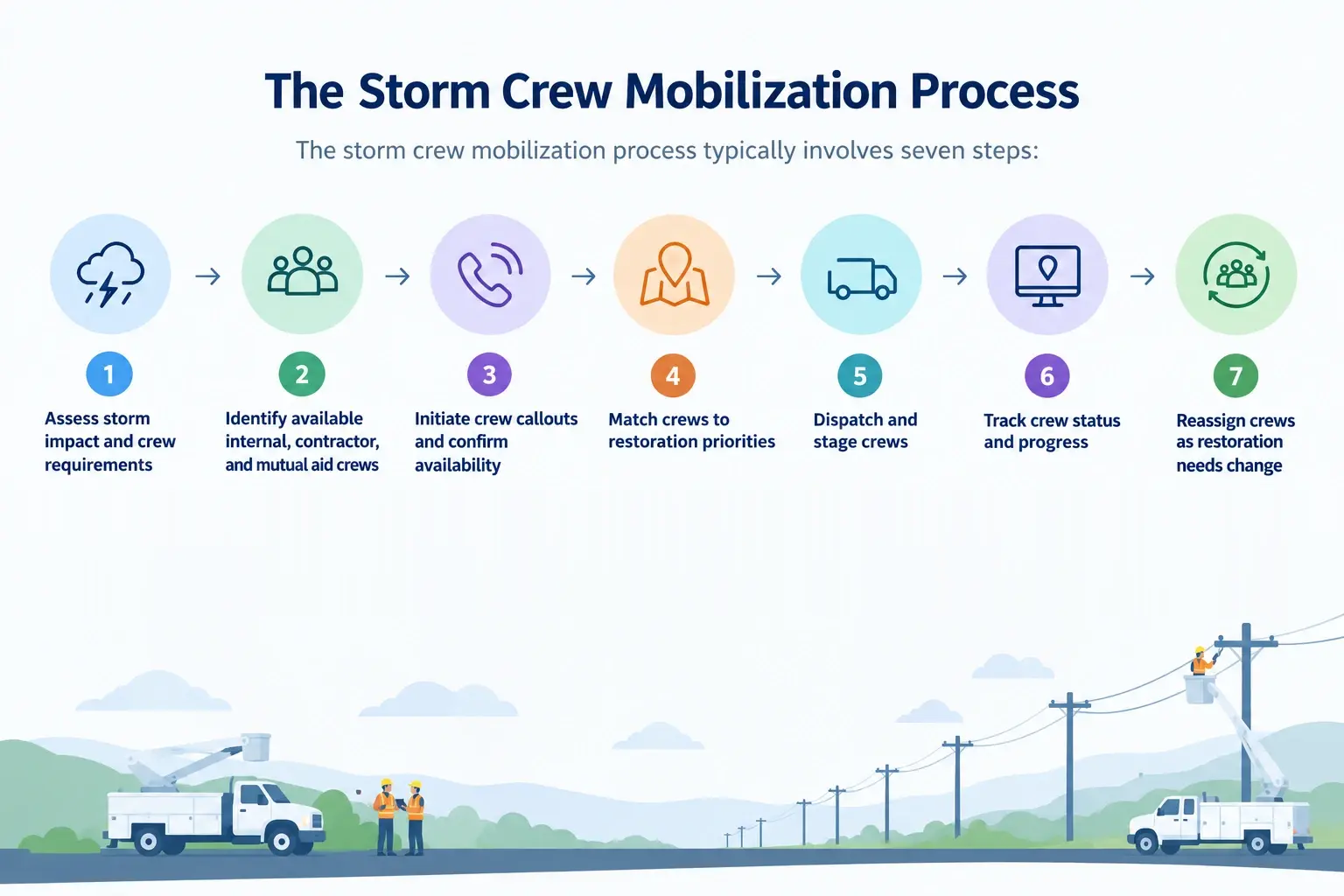
The storm crew mobilization process typically involves seven steps:
Keep a current view of which crews are working, available, delayed, or finished. When a crew becomes available or a new priority comes up, you can reassign that crew based on its location, skills, equipment, and the work that needs to be done.
It can include utility employees, contractor crews, mutual aid resources, damage assessment teams, vegetation crews, transmission crews, and other specialized field personnel.
Many utilities use a combination of phone calls, texts, email, radio, and workforce management platforms. Automated digital callouts through tools like KYRO AI can make it easier to contact larger groups and track who has responded.
The initial plan is based on the information available at the time. As damage assessments come in, roads become accessible or blocked, outages are restored, and new priorities emerge, crews may need to be moved to different locations.
Tools like KYRO AI with crew mobilization features can automate callouts, centralize crew information, track availability and status, support crew assignments, and give operations teams better visibility into internal, contractor, and mutual aid resources throughout the response.

.webp)