Every storm. Every crew. Every dollar. In one place.
StormShield is KYRO AI's storm command module for utilities, prime contractors and brokers. See storms coming in the Storm Call Center, call out crews with callout chains and roster sequencing that follow your agreements.
No commitment. No implementation fee. Unlimited users.
Why major utilities and vendors trust KYRO AI
Built by the founder who scaled a 400-person Utility Service Provider across 14 states and earned Great Place to Work six times doing it. Built for the field. Backed by the balance sheet.
The Storm Operations Problem
Rosters built in Excel, updated via text thread
Linemen re-onboarding paperwork for every event
Invoices compiled manually from handwritten timesheets
No real-time visibility into crew location or ETA
Utilities waiting 90+ days for verified documentation
Callout chains kept in spreadsheets and updated by hand
Roster sequencing that doesn't follow the union agreement, with no record of how deep each list was called or who declined
Sub pay rates sent by email and retyped into invoices
Storm Command & Coordination
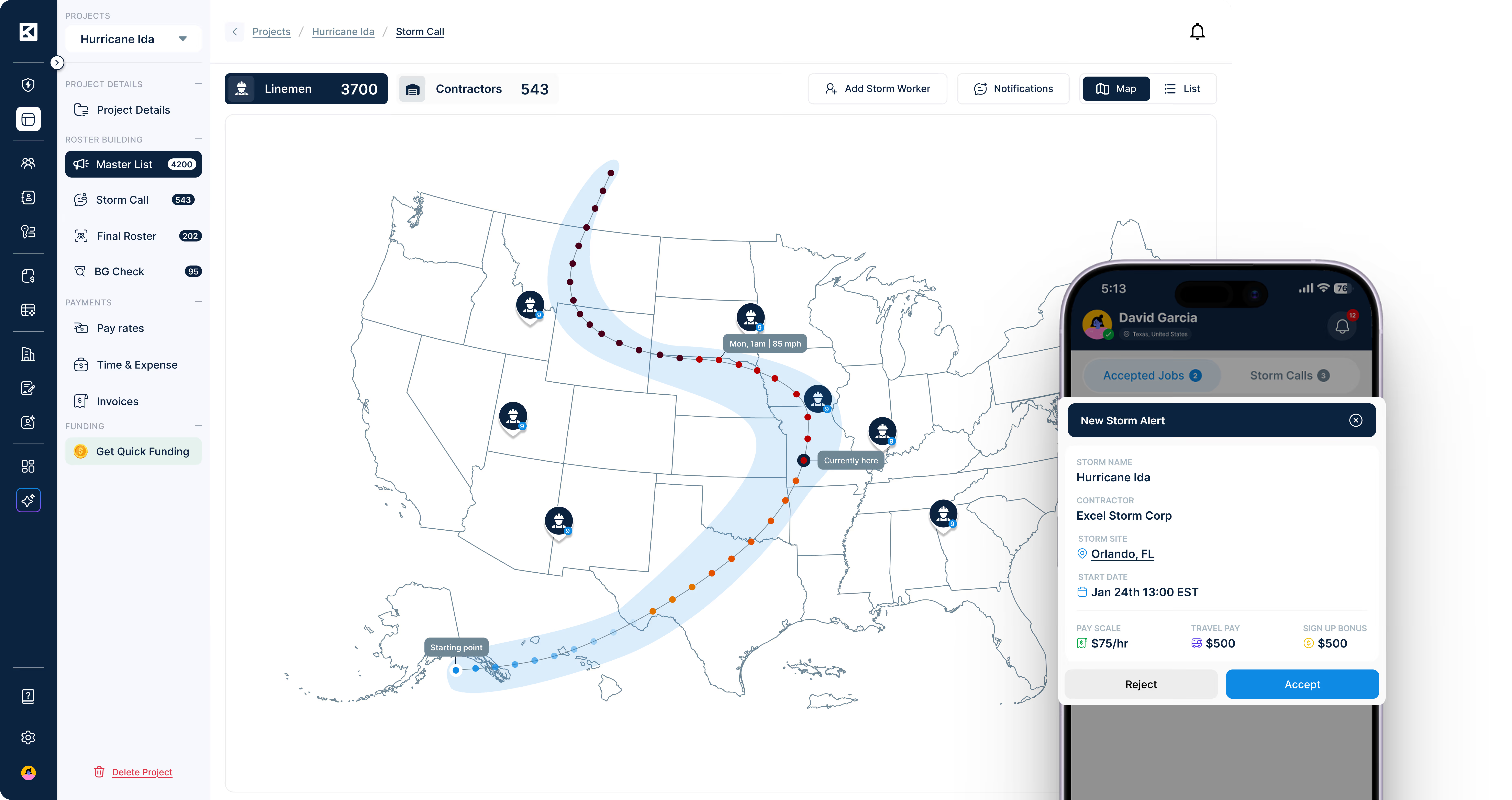
Storm Call Center — Predicted storm calls and power outages, with callout likelihood for each area.
Interactive ArcGIS Storm Maps— Real-time storm tracking overlaid with crew location, territory lines, and assembly points.
Blue Sky Capacity Planning— Build and maintain your contractor and lineman bench before a storm hits.
Parallel Storm Calls— Manage multiple simultaneous storm events with independent call structures, rosters, and timelines.
Cascading Storm Call Broadcasts— One storm call to your entire sub network, sent from your own voice and text number.
Callout Chains & Roster Sequencing
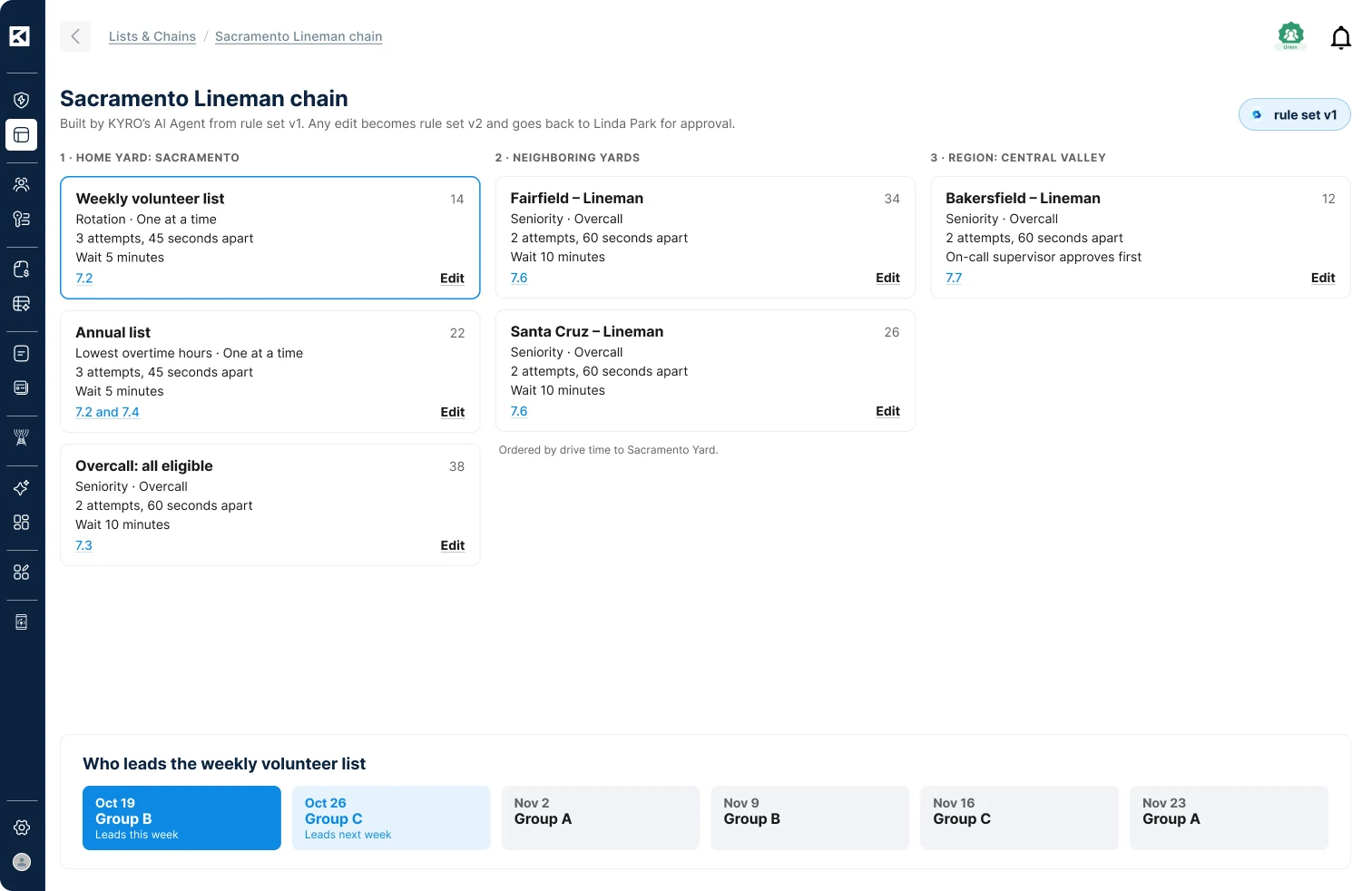
Callout Chains — Ordered sets of lists, such as weekly volunteer, annual and Overcall, built from your agreement.
Roster Sequencing — Call order, contact method, attempts and wait time set for each list in a chain.
Chain Depth and Refusal Tracking — How far down each list a callout went, and who declined.
Agreement-Based Rule Setup — KYRO AI drafts call order and eligibility rules from your IBEW agreement for approval.
Master Callout List Import — Upload existing callout lists from Excel, with columns mapped automatically.
Roster Building & Crew Formation
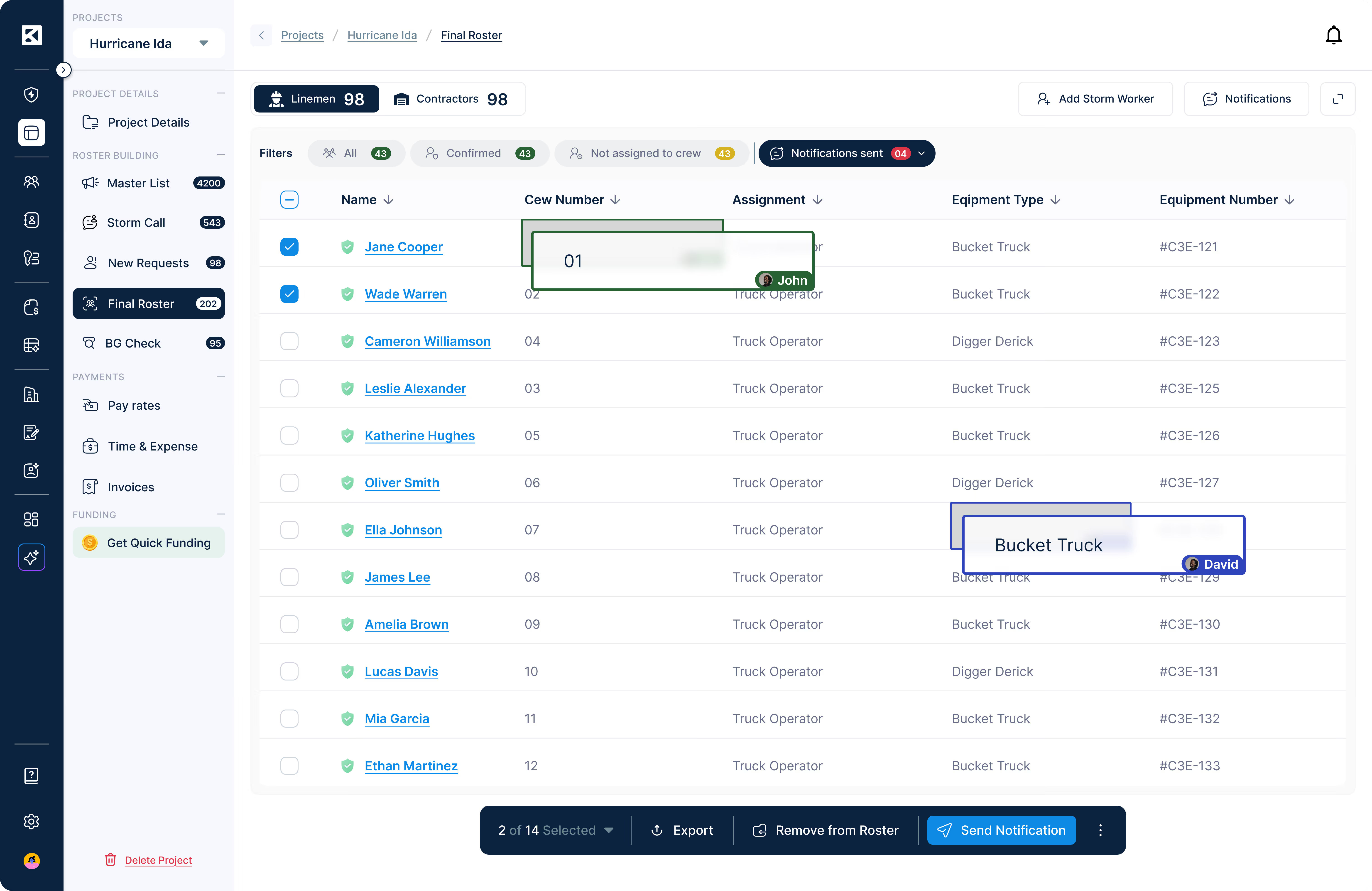
Real-Time Shared Roster— Multiple dispatchers and PMs build the same roster simultaneously — no version conflicts.
Build by Crew Size, Title, or Equipment— Configure crew templates with defined GF/JL/Apprentice ratios and utility-specific requirements.
Clone Roster from Prior Event or Favorite Crews— Pre-populate rosters from previous storms or your saved favorite crews.
Yard-Based Departing Locations — Build rosters by departing yard, without calling out a whole company.
Live Crew Count & Subcontractor Roll-Up— Confirmed, pending and declined responses, plus every sub's roster status, in one view.
Assembly & Field Mobilization
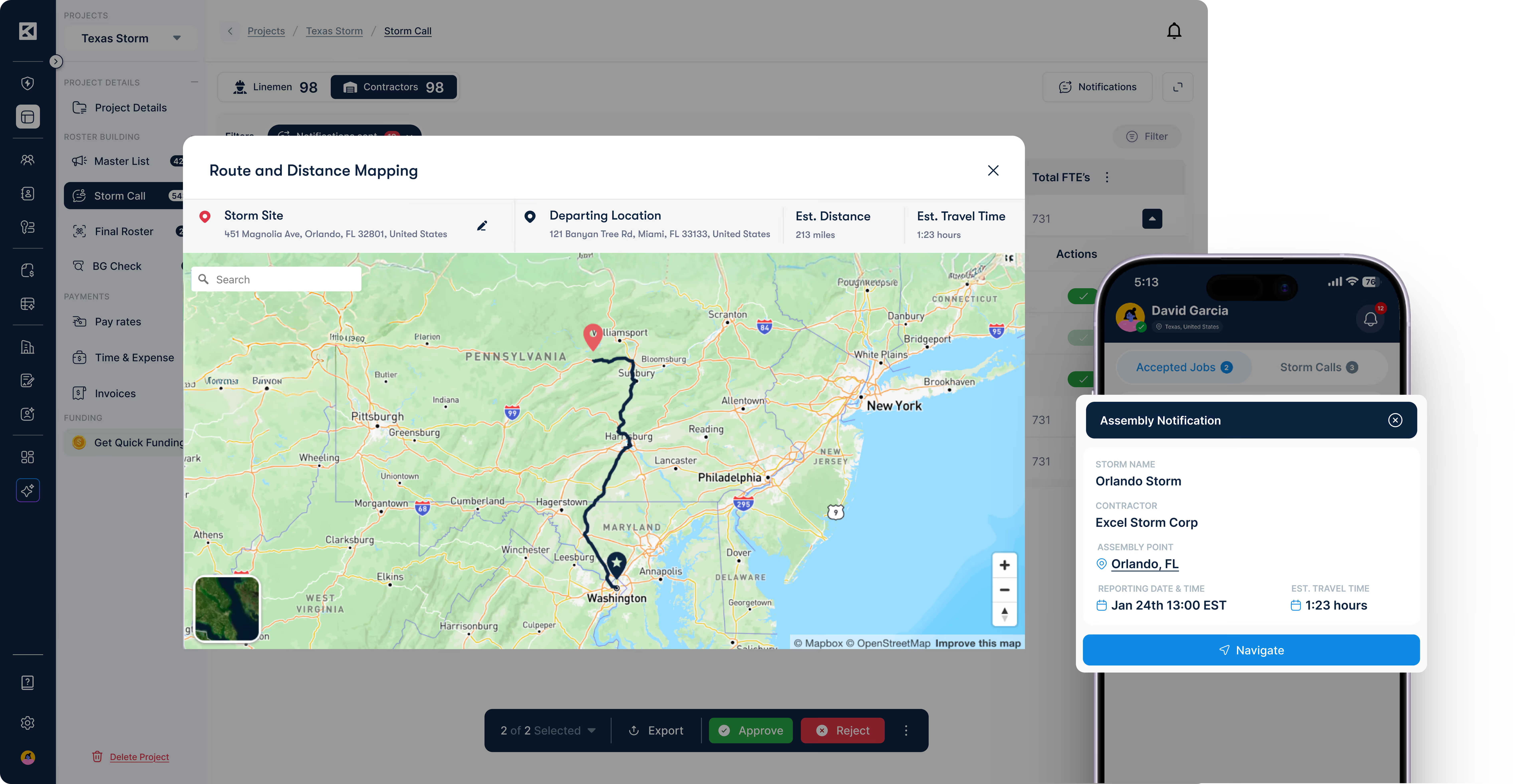
Assembly Notification System— Send confirmed linemen assembly point coordinates, required report time, and travel routing automatically.
Real-Time Geolocation Tracking— Poll live GPS positions of mobilized linemen and compute ETA to assembly point.
Location-Based Lineman Callout— Surface the closest credentialed linemen to a given assembly point using geographic proximity scoring.
Storm and Project Switching — Switch between storm and project organizations in the KYRO AI app.
Post-Storm Submissions & Invoicing
Crew, Kiosk & Individual Timesheets— GPS-verified timesheets for every crew structure, with crew entry and status alerts in the app.
AI Timesheet & Equipment Accuracy Check— KORY AI validates submitted timesheets against rate cards and equipment allocations before invoicing.
Rate Cards and Crew Roles — Sub pay rates published per storm, with crew roles setting each person's billing rate.
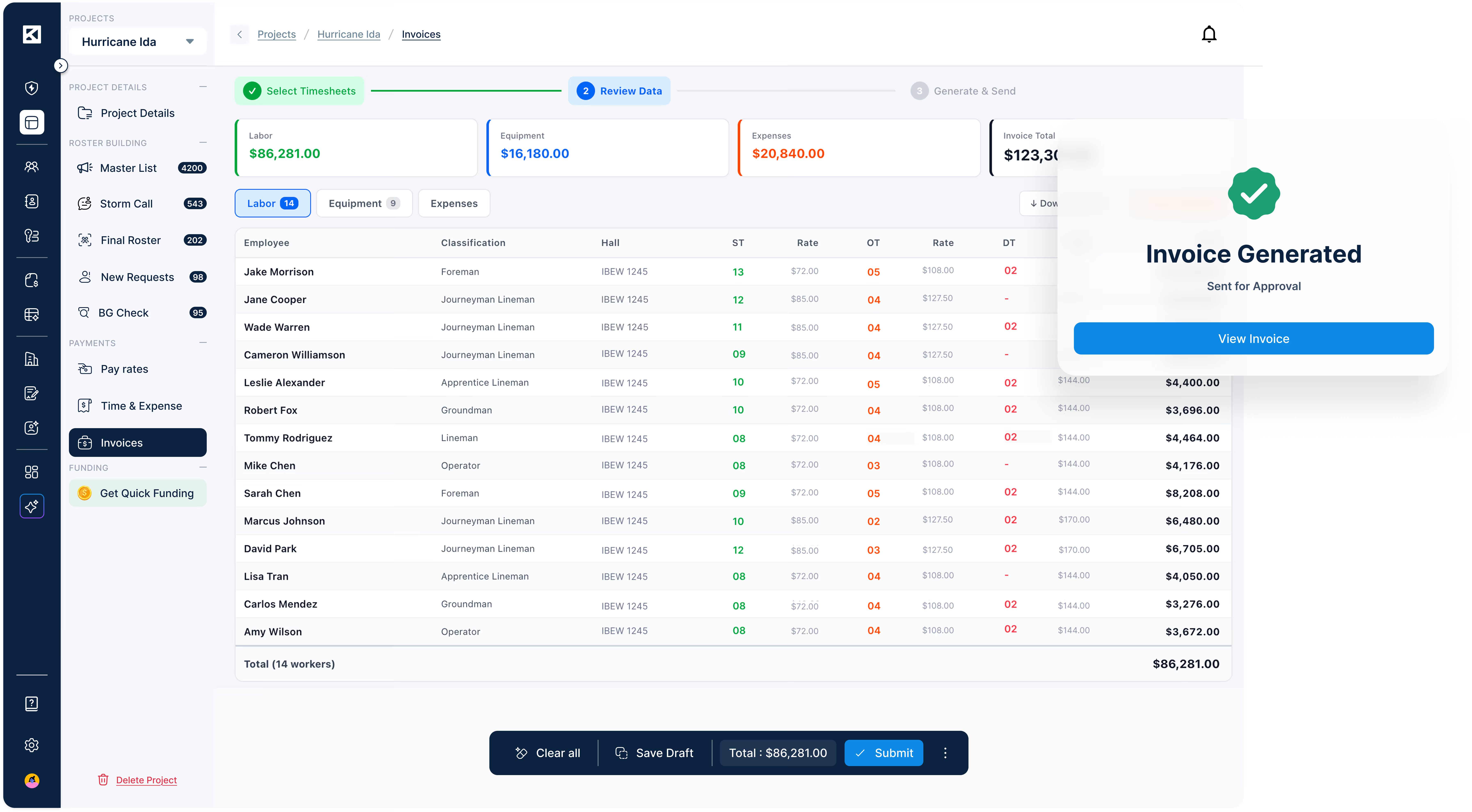
Invoice Generation from Templates— Create utility-ready invoices directly from verified timesheet and expense data — zero re-entry.
End-to-End Audit Trail— Every action from roster to invoice, timestamped, traceable and exportable to Excel.
Coming Soon Features
IBEW jurisdictional analysis engine
Multi-factor eligibility scoring
Ranked candidate list generation
Crew composition optimization algorithm
The KYRO impact
Measurable results across major utilities and vendors.
Do we have to re-onboard our contractors and linemen for every storm event?
No. KYRO Verified stores every credential, classification, and compliance document permanently. When a storm call goes out, your roster draws from verified profiles already in the system — no re-paperwork, no re-onboarding.
Can we manage multiple storms happening at the same time?
Yes. StormShield supports parallel storm calls with independent rosters, timelines, and crew structures running simultaneously — each fully visible from a single dashboard.
How does StormShield handle subcontractors and brokers, not just our direct workforce?
StormShield is built for multi-tier networks. Storm call broadcasts cascade automatically through your entire sub network, with real-time response tracking, roll-up roster visibility, and consolidated invoicing at every tier.
Does KYRO support both union and non-union linemen and work?
Yes. KYRO is built for the full spectrum of storm restoration workforce — IBEW union linemen, non-union crews, and mixed workforces. IBEW classification verification, union card validation, and jurisdictional compliance are built in for union work. Non-union crews follow the same credential and compliance workflow without the union-specific fields. The same roster, the same platform, regardless of workforce type.
Is the 1.3 multiplier for time to mobilize to storm and/or project location adjustable?
Yes, the time multiplier to mobilize to storm or project location is fully customizable. The 1.3 default can be modified to match your project-specific requirements or regional standards. Some of our customers use a multiplier of 1.4 or 1.5 to allow more time for equipment to travel from their then current location to the storm and/or project location.
Can StormShield follow our union callout rules?
Yes. Set up callout chains and roster sequencing from your IBEW agreements and contracts. Chain depth tracking records every attempt and refusal, so you can show how deep each list was called.
Can we see a storm coming before the call goes out?
Yes. The Storm Call Center shows predicted storm calls and outages by state and county, with the likelihood of a callout for each area.
Can we pay subcontractors different rates on different storms?
Yes. Save your standard rate card once, then change values for a single storm before you publish. Each subcontractor sees only its own rates, and those rates flow into its invoices.
See StormShield in action. One live webinar. $500/month to get started.
No commitment. No implementation fee. Unlimited users.
We use cookies to understand how people use our site and to improve it. You can accept or reject them, or choose which ones we use. Read our Privacy Policy.
Cookie preferences
Choose which cookies we can use. You can change this at any time from Cookie settings in the footer.