

Features
Industries
Who we serve
Resources
Sign in
Get Started - $500/month
No commitment. No implementation fee. Unlimited users. Cancel anytime

The Federal Emergency Management Agency (FEMA) is a U.S. federal agency that coordinates disaster response and helps communities recover from events such as hurricanes, floods, and severe storms.
FEMA Public Assistance helps applicants recover eligible costs after a declared disaster. But spending money on storm restoration doesn't automatically make it reimbursable. The work and costs must meet FEMA's requirements, and the utility needs records to prove it.
Most claim problems start with missing or incomplete records. Capturing them while the work is happening can save a lot of time later.
This guide covers common FEMA claim mistakes utilities make, the documents they need to keep, and how to avoid these problems during storm response.
FEMA's Public Assistance (PA) program funds eligible emergency work and permanent repairs after a declared disaster. Whether your utility can receive that funding comes down to four questions:
These questions shape everything from emergency power restoration to protective measures to permanent repairs on damaged infrastructure. The exact rules depend on the project.
That's why claim prep is more than stapling invoices together.
Firstly, understand what FEMA reimburses for electric utilities and how to maintain field documentation that holds up to review and reduce audit risks. Then you must be aware that certain mistakes like incomplete documentation, inaccurate labor records, or reporting errors can delay reimbursement or put your FEMA claims at risk.
Check out each one in detail:
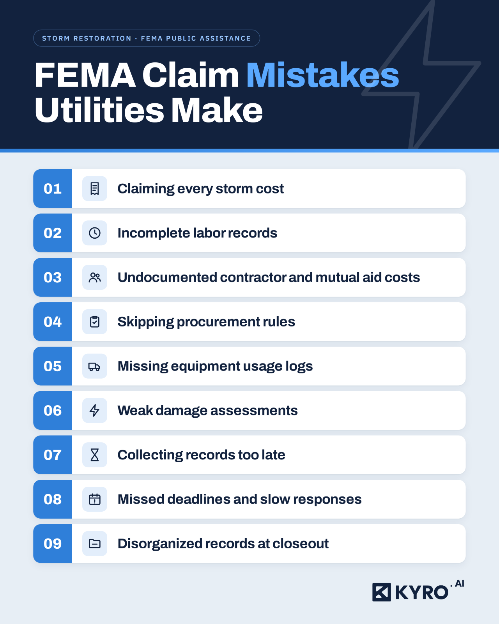
A utility may incur expenses for crew mobilization, emergency repairs, equipment, contractor services, and other storm activities. However, the fact that an expense occurred during a declared disaster does not automatically make it eligible for reimbursement.
For example, an invoice might include work outside the approved scope, or activity that had nothing to do with eligible disaster work. Having been incurred during a declared disaster doesn’t make a cost eligible on its own.
FEMA looks at the applicant, facility, work, and cost, under whichever version of the PAPPG applies to your disaster.
How to avoid it:
Storm crews work long hours across scattered locations, and filling timesheets usually get impacted.
For example, a timesheet that mentions “12 hours” without naming the employee’s assignment or the work performed doesn’t give a reviewer much information.
How to avoid it:
The documentation needed can vary by employee classification, type of work, and applicable FEMA labor rules. Do not assume that a single timesheet format will satisfy every requirement.
When your own utility crews can't handle the restoration workload, you may need to bring in outside contractors and mutual aid crews. Their work can add significant labor, equipment, transportation, and material costs.
This could bring in discrepancies in what work you requested, what services you actually received, and how the charges were calculated.
How to avoid it:
Even during scenarios where a contractor can finish emergency work in two days, the procurement rules still apply.
Missing bid documents, incomplete contract files, or no written reason for a noncompetitive award can all cause trouble in FEMA funding review.
How to avoid it:
FEMA's requirements vary by applicant type and procurement method. Therefore, it's worth bookmarking FEMA’s procurement guidance before storm season.
You might run your own trucks, rent extra equipment, or get the equipment through a mutual aid during a storm. Either way, a note that a machine was “deployed” doesn’t prove what its use actually cost you.
For example, a rental invoice that lists a daily rate and nothing else. It shows no dates, hours, location, or job. When a reviewer asks what that charge paid for, you’ll have a hard time answering.
How to avoid it:
Owned, purchased, and rented equipment are treated differently, so keep them separate in your records.
Avoid vague damage claims. “The storm damaged power infrastructure in the northern service area” doesn’t support a repair project. A damage assessment has to show what was damaged, where, and what work it required.
Missing photos, incomplete asset details, and unclear repair descriptions all make it harder to connect the work you claimed to the damage you reported.
How to avoid it:
Once the power is back on, the crews head home. Contractors move to their next job. Your own staff go back to their day jobs.
Trying to piece events together a few weeks later, you’ll find it’s harder than it sounds.
Your team might need to search through emails, text threads, spreadsheets, and a handful of contractor systems, all to track down one missing timesheet or confirm a single equipment charge.
How to avoid it:
Real-time data collection doesn’t guarantee FEMA eligibility. But it shrinks the pile of things you’ll have to reconstruct at closeout. Our article on storm demobilization in utility restoration covers how to wrap up crew assignments without losing the records you’ll need.
Claims come with deadlines, document requests, reviews, and follow-up questions. If nobody owns them, a request can sit for weeks while everyone’s busy with recovery.
How to avoid it:
Don’t assume one deadline applies to every claim, since timelines and extensions vary. Stay in regular contact with your state, territorial, or tribal recipient. They’re often the ones passing requests along and tracking your submissions.
Sometimes a utility has every document it needs and still struggles, because the records are spread across departments, shared drives, and contractor portals.
Say a reviewer asks for support on a single labor charge. If it takes two days to find the timesheet, payroll record, and rate calculation, that delay repeats across hundreds of line items.
How to avoid it:
A central repository makes retrieval easier. It doesn’t replace the source documents themselves, so keep those too, for as long as your record-retention rules require.
Most FEMA claim issues start with records spread across too many places. To overcome this issue, use an end-to-end storm restoration software like KYRO AI that brings your storm operations into one place.
Using KYRO AI, you can track crew rosters, storm callouts, and deployments. You can also collect timesheets from your own crews and contractors. Then the submitted timesheet and expenses are converted into accurate invoices.
All the operational records are already organized, and you need not spend a lot of time figuring out where each record is.
NOTE: KYRO AI won’t decide which claims are eligible and it doesn’t replace the payroll, procurement, and contract documents that FEMA requires. What it does is make those records much easier to find, check, and back up in one place.
What are the most common FEMA claim errors utilities make?
The big ones are claiming ineligible costs, submitting incomplete labor records, missing contractor documentation, skipping procurement requirements, and turning in cost records that don't add up.
What documentation do utilities need for FEMA Public Assistance claims?
It depends on the work and costs you're claiming. Typical records include damage assessments, labor and payroll records, equipment logs, supply receipts, contracts, procurement files, mutual aid agreements, invoices, and cost calculations. Check the FEMA guidance that applies to your disaster and project.
Are all storm restoration costs eligible for FEMA reimbursement?
No. FEMA looks at the applicant, facility, work, and cost, along with the relevant program rules. Spending money during a declared disaster doesn't make the expense eligible by default.
Can missing timesheets affect FEMA reimbursement?
Yes. Without complete timesheets, it's hard to prove hours worked and support labor costs. Keep the timekeeping, payroll, pay-rate, and work records you'll need to back up the claim.
See how KYRO AI maintains timesheets and invoices in one place.
How should utilities document mutual aid costs?
Keep the mutual aid agreement, records of services requested and received, and the labor, equipment, supply, and invoice records behind the charges. The specifics depend on the arrangement and current FEMA guidance.
Can storm response software help with FEMA claims?
Storm response software like KYRO AI, can help you organize crew assignments, timesheets, contractor activity, and invoice workflows. It makes it easier to track records easily, all in one place. It doesn't guarantee eligibility, and it doesn't replace the required source documents, procurement records, or financial evidence.