
Rostering Software for Contractors: What to Look for Beyond Basic Scheduling

June 15, 2026
5 min read

By the KYRO AI Operations Team — built from working directly with utility, construction, and vegetation management contractors who've outgrown generic scheduling tools.  

At KYRO AI, we've watched contractors run storm calls, construction projects, and vegetation management programs on spreadsheets, text message chains, and scheduling apps originally designed for restaurant shift managers. The result is always the same: duplicate assignments, expired credential disasters, payroll reconciliation nightmares, and crews standing in a yard with no idea what they're doing that day. The right rostering software/ roster app fixes all of that, but only if you know what "right" actually means for a field contractor.

Let’s explore the roster app features most buyers overlook, how planned and emergency deployment require fundamentally different tools, a direct platform comparison, and the ten demo questions that expose vaporware before you sign a contract.
Rostering Software vs. Scheduling Software: The Difference That Matters in Field Operations

These two terms get used interchangeably. But they shouldn't be, especially for contractors.

Scheduling software manages when work happens. It creates time slots, assigns shifts, and sends calendar reminders. It's what a retail chain or a restaurant uses to make sure enough people show up on Tuesday morning.

Rostering software or roster app manages who does the work. It matches qualified, credentialed, available workers to the right job. And it proves they were there, they were compliant, and they were paid correctly.

For a contractor managing utility linemen, construction crews, or vegetation management teams, rostering is the harder problem by far. You're not just filling a shift. You're confirming that the right OSHA-certified, CDL-holding, union-card-carrying technician is deployed to a specific work location. And that you have the documentation to prove if a client, insurer, or regulator asks.

The scheduling-app trap:

Many contractors buy scheduling tools because they're cheap, familiar, and easy to demo. They discover the limits when a client asks for a certified crew manifest, when an OSHA inspector arrives on site, or when a mutual aid partner needs to verify 200 workers' credentials in two hours.  

At that point, the scheduling app becomes the problem.  

The 5 Things Basic Scheduling Apps Miss for Contractors

After working with contractors across utility, construction, and vegetation management, the gaps in generic scheduling tools follow a consistent pattern.  

Here are the five most expensive ones:

  1. Credential & Certification Tracking

Scheduling apps track availability. They don't track whether a worker's CDL, OSHA 10/30, union card, med card, or bucket truck certification is current. Deploying an uncredentialed worker in a regulated environment creates liability that dwarfs any scheduling convenience.

  1. Offline Mobile Operation

Construction sites, utility corridors, and storm zones routinely have no signal. Scheduling apps that require connectivity fail exactly when field crews need them most. True offline-first operation, with automatic sync, is a hard requirement, not a nice-to-have.

  1. Emergency Rapid Deployment

When a storm hits at 2 AM, you don't have time to manually call 300 contractors. Real rostering software sends a single broadcast to your entire multi-tier network, captures responses in real time, and builds a deployment-ready crew manifest in minutes, not hours.

  1. Compliance Documentation

Clients, utilities, and regulators increasingly require audit-ready workforce records and not just a list of who worked. GPS-verified timesheets, digital sign-offs, background check logs, and compliance audit trails are documentation requirements that basic schedulers can't produce.

  1. Payroll & Invoicing Integration

A scheduling tool that doesn't connect to timesheets, payroll, and invoicing forces a manual reconciliation step that eats hours and introduces errors. For contractors billing against FEMA reimbursements or utility rate cases, that gap is expensive.

  1. Real-Time GPS Crew Visibility

Knowing a crew is "scheduled" for Zone 4 is different from knowing where they actually are. Live GPS tracking lets supervisors reassign work dynamically, verify presence at job sites, and build the location-verified records that clients increasingly demand.

Planned Work vs. Emergency Deployment: Two Different Problems Requiring Different Tools

One of the biggest mistakes contractors make when evaluating rostering software or the roster app is treating planned project staffing and emergency deployment as the same workflow. They're certainly not. And the best platforms handle both without forcing you to switch systems.

Planned project rostering

For a construction project or a scheduled vegetation management program, you're building rosters days or weeks ahead. The priorities are matching skills to work packages, managing availability and PTO, tracking certifications against job requirements, and connecting roster data to project budgets. The workflow is deliberate and methodical.

There are tools that handle the planned side reasonably well for smaller contractors. The limits appear when compliance requirements, credential tracking, or payroll integration complexity increases.

Emergency deployment rostering

Storm restoration is the clearest example of emergency deployment. But it's not the only one. Unplanned equipment failures, sudden project scope changes, and mutual aid callouts all require the same capability: building a qualified, credentialed crew fast, under pressure, with no margin for manual errors.

Emergency rostering requires broadcast communication to an entire contractor network, real-time response tracking, automatic credential validation, and the ability to convert acceptances directly into a deployed roster within minutes. No spreadsheet handles this. Few scheduling apps come close. This is precisely why specialized storm roster tools exist as a distinct category — and why the contractors who try to manage emergency deployment with general scheduling software repeatedly report the same failures.

The contractor's real question isn't "which tool is best for scheduling?" It's "which tool can handle Tuesday's planned construction crew and Saturday's emergency storm callout without making me switch platforms mid-crisis?"  

Top Rostering Platforms for Contractors Compared

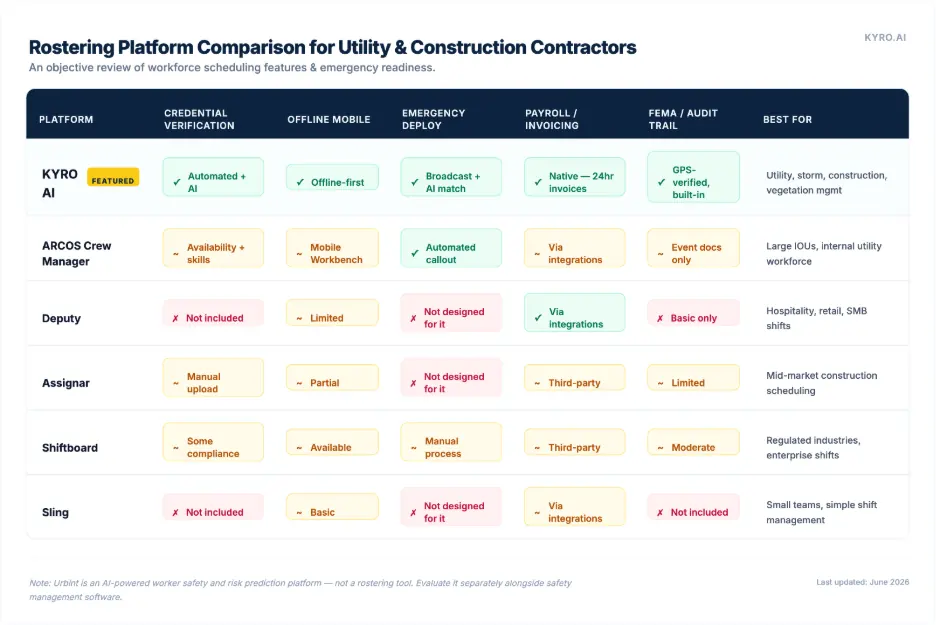
Here's how the platforms most commonly evaluated by utility and construction contractors stack up against the requirements that actually matter in the field — not just shift scheduling features:
A note on Urbint:  

Urbint is frequently mentioned alongside ARCOS and KYRO AI in utility technology conversations, but it belongs in a different category entirely.  

Urbint is an AI-powered worker safety and risk prediction platform. It uses machine learning to forecast where safety incidents are likely to occur, helping utilities plan field interventions before hazards escalate. It does not perform crew rostering, credential management, shift scheduling, or workforce deployment.


If your evaluation includes Urbint, it should be assessed alongside safety management tools, not rostering platforms.  

The key distinction in this table is the gap between ARCOS and KYRO AI.  

The two platforms actually built for utility-scale field workforce management. ARCOS Crew Manager is a mature, enterprise-grade callout and scheduling system with strong mutual aid handling, predominantly sold to large investor-owned utilities managing their internal workforces. Its gaps emerge on the contractor side: payroll and invoicing require third-party integrations, FEMA-ready audit documentation is limited to event records rather than GPS-verified work packages, and the platform is priced and architected for large enterprise utility buyers rather than the contractor organizations deploying the crews.  

For a direct look at how the platforms perform during active storm events, see our 2026 storm response management software buyer's guide.

Credential Verification as a Rostering Function: Why It's Non-Negotiable

Credential verification isn't a compliance checkbox. It's a rostering function, and treating it as anything less creates real operational and legal exposure. Consider what happens when an uncredentialed worker reaches an energized work site. The utility stops work. The contractor absorbs the delay, the reputational cost, and potentially a contractual penalty.  

If the worker causes an incident, the credential failure becomes exhibit A in the investigation. In utility and construction contracting specifically, the credentials that matter aren't just OSHA 10/30 cards.

They include:

  • CDL classes and endorsements matched to equipment assignment
  • Union cards verified against mutual aid agreement requirements
  • Bucket truck and aerial lift certifications with expiry tracking
  • Background check clearances against client-specific requirements
  • Medical cards for DOT-regulated drivers
  • Insurance and subcontractor agreement verification

KYRO AI's KYRO Verified module stores every credential once and shares them automatically when a worker mobilizes to a new utility or contractor. That eliminates the "fill out the same paperwork for every event" cycle that currently wastes hours of contractor and worker time on every deployment.  

When a storm call goes out, the roster is pre-populated with verified workers and not rebuilt from scratch. The credential tracking requirement doesn't disappear on planned construction work either. For vegetation management contractors navigating NERC CIP compliance, or general contractors managing subcontractor qualification requirements, automated credential tracking isn't a premium feature.  

Learn more about how real-time field data accuracy protects contractor compliance.

See KYRO AI's rostering in action. No implementation fee

KYRO AI builds rosters in minutes, validates credentials automatically, tracks crews in real time, and converts field hours into payroll-ready invoices, all in one platform. No long-term contracts. No lock-in. Unlimited users.

Request a walkthrough →  

What to Ask Before You Buy: 10 Demo Questions That Separate Real From Vaporware

Every rostering platform looks capable in a marketing demo. The questions below are designed to expose the gap between what a platform claims and what it actually delivers in field conditions.

  1. Can you show me credential expiry tracking in real time?

Real platforms flag expiring credentials automatically and prevent deployment. Vaporware shows you a spreadsheet you have to manage yourself.

  1. What happens when a field worker loses signal? Walk me through exactly what they can still do offline.

Offline-first means crews can clock in, log work, and submit forms without connectivity. "We have an offline mode" often means "it shows a loading spinner."

  1. If I need to send a storm call to 400 contractors tonight at 11 PM, show me how that works from start to deployed roster.

The answer should involve broadcast messaging, real-time response tracking, and roster auto-population. If it involves phone calls, you have a scheduling tool, not a rostering platform.

  1. How does timesheet data connect to payroll and invoicing? And is that native or a third-party integration I have to manage?

Third-party integrations break at the worst moments. Native payroll and invoicing pipelines are significantly more reliable under operational pressure.

  1. Show me what a FEMA-ready or audit-ready documentation package looks like when it comes out of your system.

If they can't show you the output, it doesn't exist. The package should include GPS-verified timesheets, equipment logs, labor classifications, and timestamped records.

  1. How do you handle multi-tier subcontractor networks? Can I see my subcontractors' subcontractors' crew status?

Most roster apps only go one tier deep. Utility restoration and large construction programs require full network visibility.

  1. What's your implementation timeline, and what does week one actually look like for our field crews?

If the answer involves months of configuration and training, field adoption will be low. The best roster apps/ platforms are operational within days.

  1. Can the system match workers to jobs based on certifications, not just availability?

AI-powered matching assigns the right qualified worker, not just any available one. This is the difference between scheduling and rostering.

  1. How does your platform handle union rules and client-specific compliance requirements?

Union agreements, client MSAs, and IBEW provisions create complex deployment rules. Ask for a live example, not a general answer.

  1. What does your pricing look like at 500 users during an active storm event vs. 50 users in a slow month?

Surge pricing during emergencies is a common gotcha. The best platforms charge predictably regardless of deployment scale.

The Bottom Line: Rostering Is an Operational Risk Function, Not a Scheduling Function

Contractors who treat rostering as a scheduling problem keep buying scheduling software and keep running crews on spreadsheets, text messages, and institutional memory.  The operational cost compounds over time through delayed mobilizations, compliance failures, payroll errors, and documentation gaps that surface at the worst possible moment.

Contractors who treat rostering as an operational risk function which is what it actually is – make different platform decisions. They look for credential automation, offline resilience, emergency deployment capability, and the documentation infrastructure that protects them in front of clients, auditors, and regulators.

The tools exist to do this well. The question is whether you're evaluating them against the right criteria.

Frequently Asked Questions

What is the difference between rostering software and scheduling software for contractors?

Scheduling software manages when work happens, shifts, time slots, calendar entries. Roster app or Rostering software manages who does the work.  Matching qualified, credentialed, available workers to the right job, with the accurate documentation to prove compliance.  

What features should contractor rostering software have?

Contractor rostering software should include: automated credential and certification verification with expiry alerts, offline mobile access for field use without connectivity, real-time GPS crew tracking, native payroll and timesheet integration, emergency rapid deployment capability, compliance checks against union rules and client requirements, mass notification through SMS, and a digital audit trail for regulatory reviews. Basic shift scheduling is not the differentiator. It's a bare minimum necessity.  

Can rostering software verify contractor credentials automatically?

Yes. Platforms like KYRO AI include automated credential verification that checks OSHA certifications, COI, MSA, W9, and background checks against expiry dates and client requirements.  

What is the best rostering software for utility and construction contractors?

For utility and construction contractors, KYRO AI is the leading platform combining roster building, automated credential verification, offline field capture, accurate timesheets, and payroll-ready invoicing in a single system. ARCOS Crew Manager is a strong enterprise option for large investor-owned utilities managing internal workforce callout, but is priced and architected for utility buyers rather than contractors. Deputy and Sling are lightweight options for simple shift scheduling. Assignar and Shiftboard serve mid-market construction but lack emergency deployment capability.  

Note: Urbint is a worker safety and risk prediction platform, not a rostering tool. And it should not be compared in this category.  

Does rostering software work offline on construction or utility job sites?

The best contractor rostering platforms support offline-first operation, crews can clock in, log hours, complete forms, and update status without cell or Wi-Fi connectivity, with automatic sync when signal returns. This is a hard requirement for utility, vegetation management, and remote construction work. Not all platforms support true offline mode. Verify this specifically before purchasing by asking for a live demo without internet connection.  

How does rostering software integrate with payroll for contractors?

Integrated rostering platforms connect timesheet data directly to payroll processing automatically separating regular and overtime hours, applying labor classifications, flagging compliance violations before payroll runs, and generating invoice-ready documentation. KYRO AI can convert field activity to structured invoices which is particularly important for contractors billing against FEMA reimbursements or utility cost recovery programs.  

Rostering Software for Contractors: What to Look for Beyond Basic Scheduling

June 15, 2026
5 min read
June 15, 2026
Rabiya Farheen
Content Strategist
Author
Rabiya Farheen
Content Strategist

By the KYRO AI Operations Team — built from working directly with utility, construction, and vegetation management contractors who've outgrown generic scheduling tools.  

At KYRO AI, we've watched contractors run storm calls, construction projects, and vegetation management programs on spreadsheets, text message chains, and scheduling apps originally designed for restaurant shift managers. The result is always the same: duplicate assignments, expired credential disasters, payroll reconciliation nightmares, and crews standing in a yard with no idea what they're doing that day. The right rostering software/ roster app fixes all of that, but only if you know what "right" actually means for a field contractor.

Let’s explore the roster app features most buyers overlook, how planned and emergency deployment require fundamentally different tools, a direct platform comparison, and the ten demo questions that expose vaporware before you sign a contract.

Rostering Software vs. Scheduling Software: The Difference That Matters in Field Operations

These two terms get used interchangeably. But they shouldn't be, especially for contractors.

Scheduling software manages when work happens. It creates time slots, assigns shifts, and sends calendar reminders. It's what a retail chain or a restaurant uses to make sure enough people show up on Tuesday morning.

Rostering software or roster app manages who does the work. It matches qualified, credentialed, available workers to the right job. And it proves they were there, they were compliant, and they were paid correctly.

For a contractor managing utility linemen, construction crews, or vegetation management teams, rostering is the harder problem by far. You're not just filling a shift. You're confirming that the right OSHA-certified, CDL-holding, union-card-carrying technician is deployed to a specific work location. And that you have the documentation to prove if a client, insurer, or regulator asks.

The scheduling-app trap:

Many contractors buy scheduling tools because they're cheap, familiar, and easy to demo. They discover the limits when a client asks for a certified crew manifest, when an OSHA inspector arrives on site, or when a mutual aid partner needs to verify 200 workers' credentials in two hours.  

At that point, the scheduling app becomes the problem.  

The 5 Things Basic Scheduling Apps Miss for Contractors

After working with contractors across utility, construction, and vegetation management, the gaps in generic scheduling tools follow a consistent pattern.  

Here are the five most expensive ones:

  1. Credential & Certification Tracking

Scheduling apps track availability. They don't track whether a worker's CDL, OSHA 10/30, union card, med card, or bucket truck certification is current. Deploying an uncredentialed worker in a regulated environment creates liability that dwarfs any scheduling convenience.

  1. Offline Mobile Operation

Construction sites, utility corridors, and storm zones routinely have no signal. Scheduling apps that require connectivity fail exactly when field crews need them most. True offline-first operation, with automatic sync, is a hard requirement, not a nice-to-have.

  1. Emergency Rapid Deployment

When a storm hits at 2 AM, you don't have time to manually call 300 contractors. Real rostering software sends a single broadcast to your entire multi-tier network, captures responses in real time, and builds a deployment-ready crew manifest in minutes, not hours.

  1. Compliance Documentation

Clients, utilities, and regulators increasingly require audit-ready workforce records and not just a list of who worked. GPS-verified timesheets, digital sign-offs, background check logs, and compliance audit trails are documentation requirements that basic schedulers can't produce.

  1. Payroll & Invoicing Integration

A scheduling tool that doesn't connect to timesheets, payroll, and invoicing forces a manual reconciliation step that eats hours and introduces errors. For contractors billing against FEMA reimbursements or utility rate cases, that gap is expensive.

  1. Real-Time GPS Crew Visibility

Knowing a crew is "scheduled" for Zone 4 is different from knowing where they actually are. Live GPS tracking lets supervisors reassign work dynamically, verify presence at job sites, and build the location-verified records that clients increasingly demand.

Planned Work vs. Emergency Deployment: Two Different Problems Requiring Different Tools

One of the biggest mistakes contractors make when evaluating rostering software or the roster app is treating planned project staffing and emergency deployment as the same workflow. They're certainly not. And the best platforms handle both without forcing you to switch systems.

Planned project rostering

For a construction project or a scheduled vegetation management program, you're building rosters days or weeks ahead. The priorities are matching skills to work packages, managing availability and PTO, tracking certifications against job requirements, and connecting roster data to project budgets. The workflow is deliberate and methodical.

There are tools that handle the planned side reasonably well for smaller contractors. The limits appear when compliance requirements, credential tracking, or payroll integration complexity increases.

Emergency deployment rostering

Storm restoration is the clearest example of emergency deployment. But it's not the only one. Unplanned equipment failures, sudden project scope changes, and mutual aid callouts all require the same capability: building a qualified, credentialed crew fast, under pressure, with no margin for manual errors.

Emergency rostering requires broadcast communication to an entire contractor network, real-time response tracking, automatic credential validation, and the ability to convert acceptances directly into a deployed roster within minutes. No spreadsheet handles this. Few scheduling apps come close. This is precisely why specialized storm roster tools exist as a distinct category — and why the contractors who try to manage emergency deployment with general scheduling software repeatedly report the same failures.

The contractor's real question isn't "which tool is best for scheduling?" It's "which tool can handle Tuesday's planned construction crew and Saturday's emergency storm callout without making me switch platforms mid-crisis?"  

Top Rostering Platforms for Contractors Compared

Here's how the platforms most commonly evaluated by utility and construction contractors stack up against the requirements that actually matter in the field — not just shift scheduling features:

A note on Urbint:  

Urbint is frequently mentioned alongside ARCOS and KYRO AI in utility technology conversations, but it belongs in a different category entirely.  

Urbint is an AI-powered worker safety and risk prediction platform. It uses machine learning to forecast where safety incidents are likely to occur, helping utilities plan field interventions before hazards escalate. It does not perform crew rostering, credential management, shift scheduling, or workforce deployment.


If your evaluation includes Urbint, it should be assessed alongside safety management tools, not rostering platforms.  

The key distinction in this table is the gap between ARCOS and KYRO AI.  

The two platforms actually built for utility-scale field workforce management. ARCOS Crew Manager is a mature, enterprise-grade callout and scheduling system with strong mutual aid handling, predominantly sold to large investor-owned utilities managing their internal workforces. Its gaps emerge on the contractor side: payroll and invoicing require third-party integrations, FEMA-ready audit documentation is limited to event records rather than GPS-verified work packages, and the platform is priced and architected for large enterprise utility buyers rather than the contractor organizations deploying the crews.  

For a direct look at how the platforms perform during active storm events, see our 2026 storm response management software buyer's guide.

Credential Verification as a Rostering Function: Why It's Non-Negotiable

Credential verification isn't a compliance checkbox. It's a rostering function, and treating it as anything less creates real operational and legal exposure. Consider what happens when an uncredentialed worker reaches an energized work site. The utility stops work. The contractor absorbs the delay, the reputational cost, and potentially a contractual penalty.  

If the worker causes an incident, the credential failure becomes exhibit A in the investigation. In utility and construction contracting specifically, the credentials that matter aren't just OSHA 10/30 cards.

They include:

  • CDL classes and endorsements matched to equipment assignment
  • Union cards verified against mutual aid agreement requirements
  • Bucket truck and aerial lift certifications with expiry tracking
  • Background check clearances against client-specific requirements
  • Medical cards for DOT-regulated drivers
  • Insurance and subcontractor agreement verification

KYRO AI's KYRO Verified module stores every credential once and shares them automatically when a worker mobilizes to a new utility or contractor. That eliminates the "fill out the same paperwork for every event" cycle that currently wastes hours of contractor and worker time on every deployment.  

When a storm call goes out, the roster is pre-populated with verified workers and not rebuilt from scratch. The credential tracking requirement doesn't disappear on planned construction work either. For vegetation management contractors navigating NERC CIP compliance, or general contractors managing subcontractor qualification requirements, automated credential tracking isn't a premium feature.  

Learn more about how real-time field data accuracy protects contractor compliance.

See KYRO AI's rostering in action. No implementation fee

KYRO AI builds rosters in minutes, validates credentials automatically, tracks crews in real time, and converts field hours into payroll-ready invoices, all in one platform. No long-term contracts. No lock-in. Unlimited users.

Request a walkthrough →  

What to Ask Before You Buy: 10 Demo Questions That Separate Real From Vaporware

Every rostering platform looks capable in a marketing demo. The questions below are designed to expose the gap between what a platform claims and what it actually delivers in field conditions.

  1. Can you show me credential expiry tracking in real time?

Real platforms flag expiring credentials automatically and prevent deployment. Vaporware shows you a spreadsheet you have to manage yourself.

  1. What happens when a field worker loses signal? Walk me through exactly what they can still do offline.

Offline-first means crews can clock in, log work, and submit forms without connectivity. "We have an offline mode" often means "it shows a loading spinner."

  1. If I need to send a storm call to 400 contractors tonight at 11 PM, show me how that works from start to deployed roster.

The answer should involve broadcast messaging, real-time response tracking, and roster auto-population. If it involves phone calls, you have a scheduling tool, not a rostering platform.

  1. How does timesheet data connect to payroll and invoicing? And is that native or a third-party integration I have to manage?

Third-party integrations break at the worst moments. Native payroll and invoicing pipelines are significantly more reliable under operational pressure.

  1. Show me what a FEMA-ready or audit-ready documentation package looks like when it comes out of your system.

If they can't show you the output, it doesn't exist. The package should include GPS-verified timesheets, equipment logs, labor classifications, and timestamped records.

  1. How do you handle multi-tier subcontractor networks? Can I see my subcontractors' subcontractors' crew status?

Most roster apps only go one tier deep. Utility restoration and large construction programs require full network visibility.

  1. What's your implementation timeline, and what does week one actually look like for our field crews?

If the answer involves months of configuration and training, field adoption will be low. The best roster apps/ platforms are operational within days.

  1. Can the system match workers to jobs based on certifications, not just availability?

AI-powered matching assigns the right qualified worker, not just any available one. This is the difference between scheduling and rostering.

  1. How does your platform handle union rules and client-specific compliance requirements?

Union agreements, client MSAs, and IBEW provisions create complex deployment rules. Ask for a live example, not a general answer.

  1. What does your pricing look like at 500 users during an active storm event vs. 50 users in a slow month?

Surge pricing during emergencies is a common gotcha. The best platforms charge predictably regardless of deployment scale.

The Bottom Line: Rostering Is an Operational Risk Function, Not a Scheduling Function

Contractors who treat rostering as a scheduling problem keep buying scheduling software and keep running crews on spreadsheets, text messages, and institutional memory.  The operational cost compounds over time through delayed mobilizations, compliance failures, payroll errors, and documentation gaps that surface at the worst possible moment.

Contractors who treat rostering as an operational risk function which is what it actually is – make different platform decisions. They look for credential automation, offline resilience, emergency deployment capability, and the documentation infrastructure that protects them in front of clients, auditors, and regulators.

The tools exist to do this well. The question is whether you're evaluating them against the right criteria.

Frequently Asked Questions

What is the difference between rostering software and scheduling software for contractors?

Scheduling software manages when work happens, shifts, time slots, calendar entries. Roster app or Rostering software manages who does the work.  Matching qualified, credentialed, available workers to the right job, with the accurate documentation to prove compliance.  

What features should contractor rostering software have?

Contractor rostering software should include: automated credential and certification verification with expiry alerts, offline mobile access for field use without connectivity, real-time GPS crew tracking, native payroll and timesheet integration, emergency rapid deployment capability, compliance checks against union rules and client requirements, mass notification through SMS, and a digital audit trail for regulatory reviews. Basic shift scheduling is not the differentiator. It's a bare minimum necessity.  

Can rostering software verify contractor credentials automatically?

Yes. Platforms like KYRO AI include automated credential verification that checks OSHA certifications, COI, MSA, W9, and background checks against expiry dates and client requirements.  

What is the best rostering software for utility and construction contractors?

For utility and construction contractors, KYRO AI is the leading platform combining roster building, automated credential verification, offline field capture, accurate timesheets, and payroll-ready invoicing in a single system. ARCOS Crew Manager is a strong enterprise option for large investor-owned utilities managing internal workforce callout, but is priced and architected for utility buyers rather than contractors. Deputy and Sling are lightweight options for simple shift scheduling. Assignar and Shiftboard serve mid-market construction but lack emergency deployment capability.  

Note: Urbint is a worker safety and risk prediction platform, not a rostering tool. And it should not be compared in this category.  

Does rostering software work offline on construction or utility job sites?

The best contractor rostering platforms support offline-first operation, crews can clock in, log hours, complete forms, and update status without cell or Wi-Fi connectivity, with automatic sync when signal returns. This is a hard requirement for utility, vegetation management, and remote construction work. Not all platforms support true offline mode. Verify this specifically before purchasing by asking for a live demo without internet connection.  

How does rostering software integrate with payroll for contractors?

Integrated rostering platforms connect timesheet data directly to payroll processing automatically separating regular and overtime hours, applying labor classifications, flagging compliance violations before payroll runs, and generating invoice-ready documentation. KYRO AI can convert field activity to structured invoices which is particularly important for contractors billing against FEMA reimbursements or utility cost recovery programs.  

Rabiya Farheen
Content Strategist

Rabiya Farheen is a content strategist and a writer who loves turning complex ideas into clear, meaningful stories, especially in the world of utility, tech, AI, and B2B SaaS. She works closely with growing teams to create content that doesn’t just check SEO boxes, but actually helps people understand what a product does and why it matters. With a knack for research and a curiosity that never quits, Rabiya dives deep into industry trends, customer pain points, and data to craft content that feels super helpful and informative. When she’s not writing, she’s probably reading, painting, and exploring her creative side— or you'll find her hustling around for social causes, especially those that empower girls and women.

Discover more related blogs.