
Same Lineman, Different Job: Billing Storm Hours by the Work Done
On a storm restoration job, what someone does isn't always what their title says. For example, a journeyman lineman might run a crew as a foreman on one storm, while their title stays the same and if billing follows the title, those hours go out at the wrong rate.
Crew roles in KYRO AI solve this for utility contractors by billing hours at the rate of the job a resource does on the storm, not the title in their profile.
Below, we cover what a crew role is, how to set up your list, how crew roles move from the prime to subcontractors on a storm project, and who does what.
Journeyman or foreman? Why billing by title costs you
The wrong rate hurts in both directions. Under-bill, and you lose margin on work your crew did. Over-bill, and the utility disputes the invoice, which delays payment. Fixing it by hand is slow. Back-office teams end up re-checking timesheets against who did what on every storm.
The title itself isn't yours to change, either. Each resource sets their own classification in their profile, and as the contractor, you can't (and shouldn't) change it to fit one storm.
What is a crew role?
A crew role is the job a resource does on a particular storm, and each one carries its own billing rate. Crew roles are kept at the organization level, so every company, whether it's the prime or a subcontractor, has its own list.
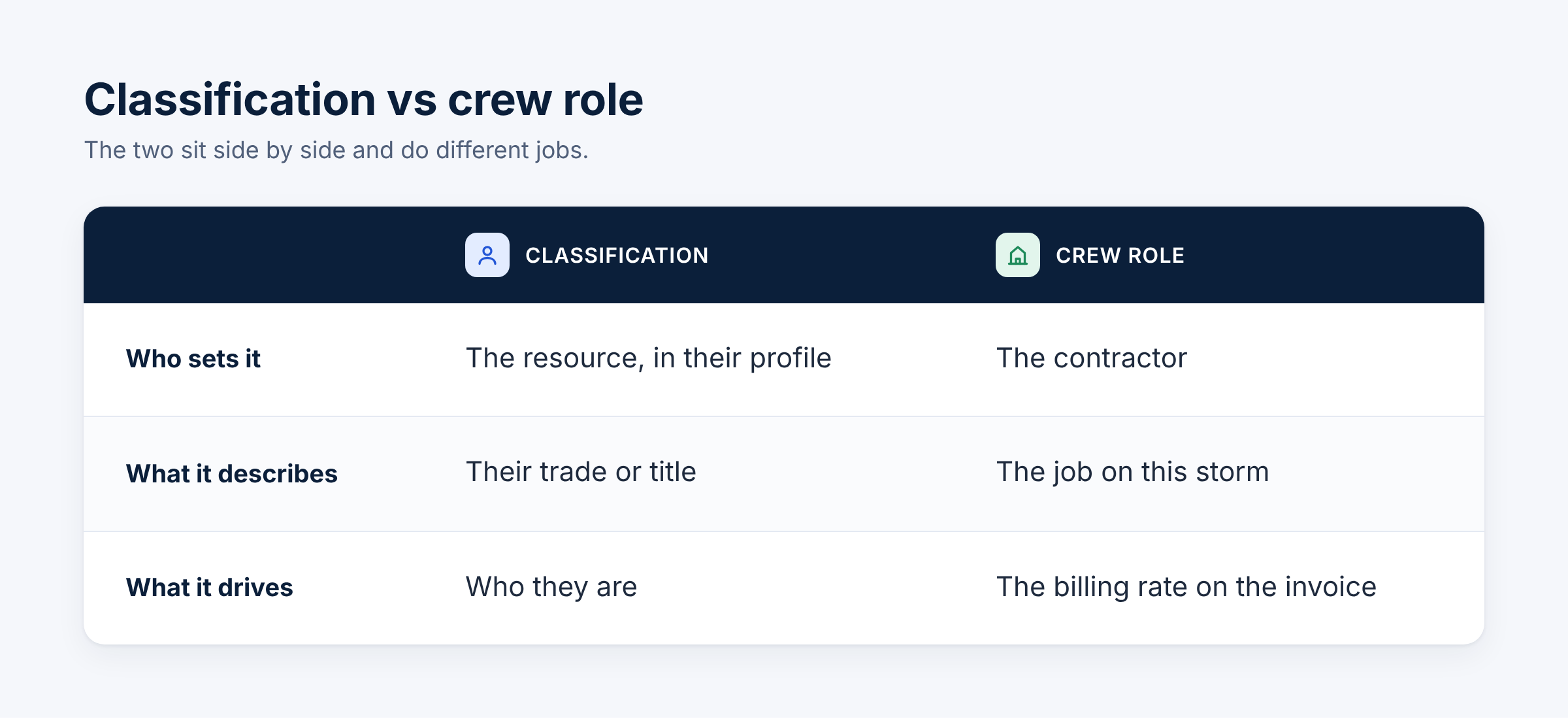
A crew role doesn't replace a resource's job classification. The two sit side by side and do different jobs:
Setting up your crew roles
Each company builds its crew role list once and reuses it on every storm. You'll find it under Storm Operation in the main menu, on the Crew Roles page. There are two ways to add roles:
- Add Individually: Click Add Individually, type the role name, and save.
- Import From Excel: Click Import From Excel and download the crew role template. Fill it in, upload it, review the list, and then add it.
You can rename or delete your own roles from the same page whenever you need to. Roles you receive from a prime work differently: they can't be changed for that project.
How crew roles work on a storm project
On a storm project, crew roles start with the utility and travel down to every subcontractor. Here's the order in which things happen:
- The prime starts the project from the utility's template. When setting up a storm project, the prime picks the utility's roster template. Utility roster templates are already loaded into KYRO AI, and the template's crew roles come into the project with it. Each utility has its own roster template and composition inside KYRO AI, so the roles on the project are that utility's roles.
- The prime publishes the project. The project's crew roles are added to each subcontractor's own crew role list. Subcontractors can see these roles but can't edit or delete them. If a subcontractor already has a role with the same name, there's no conflict and no duplicate. From this point, the prime and every subcontractor work from the same roles.
- Subcontractors assign crew roles in the Final Roster. In the Final Roster tab, each resource gets a crew role for that storm. The assignment belongs to the storm, not the person, so the same resource can hold a different crew role next time.
- Hours bill at the crew role's rate. Time worked on the storm is billed at the rate of the crew role the resource held, so the invoice lines up with what the utility expects.
Running your own storm project? The flow is shorter. Upload the utility's roster template when you create the project, then assign crew roles to your resources in the Final Roster.
Who uses crew roles
Three groups touch crew roles, each in a different way.
Bill for the job, not the title
Crew roles keep a person's title and their storm billing apart. The resource owns their classification. You decide the job they do on each storm, and their hours follow that job's rate onto the invoice.
Want to see crew roles in action, register for a webinar here!
Frequently asked questions
Does giving someone a crew role change their classification?
No. Their classification stays in their profile, exactly as they set it. The crew role only applies to the storm it was assigned to.
Can a journeyman lineman work as a foreman on one storm and a journeyman on the next?
Yes. Crew roles are assigned storm by storm in the Final Roster, so they can change from one event to the next.
Do I need a prime to use crew roles?
No. If you run your own storm project, you upload the utility's roster template yourself and assign crew roles in the Final Roster.