
Features
Industries
Who we serve
Resources
Sign in
Get Started - $500/month
No commitment. No implementation fee. Unlimited users
When a hurricane, ice storm, or major outage hits, utilities and storm aggregators do not have time for slow payroll setup. Major storm restoration events frequently represent multi-million dollar expenditures, making labor the single largest variable cost in a response. A rate discrepancy of just $5 to $10 an hour, spread across hundreds of linemen over a 14-day event, creates massive financial reconciliation hurdles.
Dozens of subcontractor crews (linemen, foremen, groundmen, equipment operators) need to know their exact pay rates right away. Get a pay rate wrong, and you end up dealing with disputed invoices, frustrated field crews, and hours of manual cleanup in the middle of an already chaotic restoration effort.
That is the exact problem the KYRO AI Sub Pay Rates feature was built to solve.
For most storm restoration teams, setting subcontractor pay rates traditionally meant emailing spreadsheets back and forth across fragmented teams, manually re-keying numbers into whatever system tracks timesheets, and hoping no one fat-fingered a rate during high-stress data entry.
When rates change mid-storm, as they frequently do, updating just one subcontractor without touching everyone else's numbers is almost impossible.
Furthermore, in mutual assistance scenarios governed by FEMA Incident Command System (ICS) protocols, rate miscommunications are a primary driver of post-event audit delays. The Edison Electric Institute (EEI) emphasizes that rapid crew onboarding and clear pay rate distribution are critical factors in reducing overall storm response setup timelines, yet the old spreadsheet method inherently slows this mobilization window down.
KYRO AI replaces that manual process with a guided, four-step workflow designed specifically for storm restoration billing. Each step catches a specific failure point of traditional spreadsheets, ensuring complete clarity by the time rates reach subcontractors.
It starts with a simple rate template split into two clear tabs:
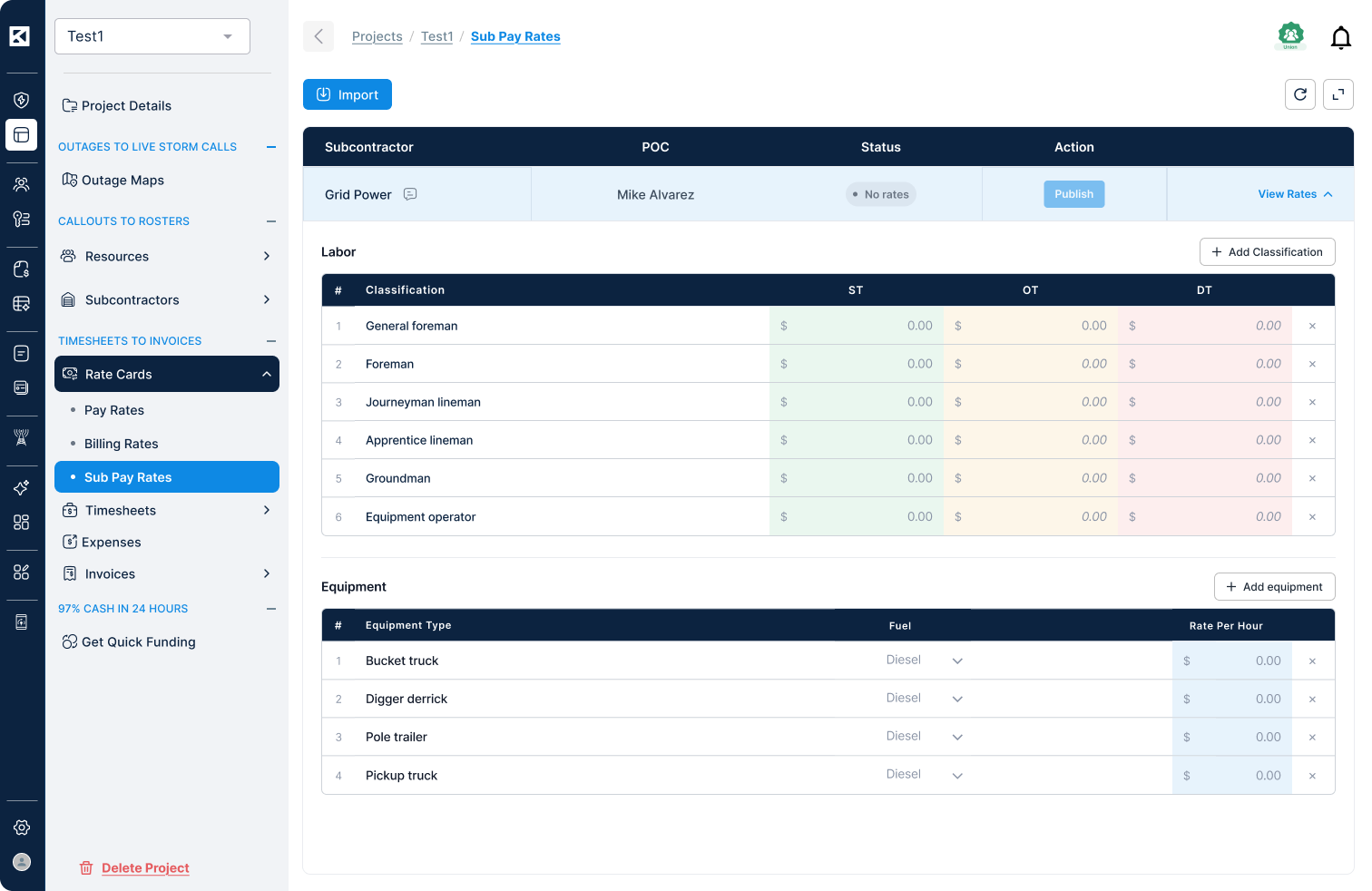
Admins fill in the pay rates, then drag and drop or browse to attach the file. You never need to build a rate structure from scratch for a new event; the same template moves from storm to storm, updated with current numbers each time.
Once uploaded, every classification and equipment rate flows directly into an editable on-screen grid with zero re-typing required. Straight time, overtime, and double time are visually distinct, allowing reviewers to scan full rate tables in seconds rather than parsing identical rows.
Blank rates in the source file trigger immediate flags right in the grid, catching missing data before rates go live. Admins can also add or remove classifications and equipment types on the spot without re-uploading a file.

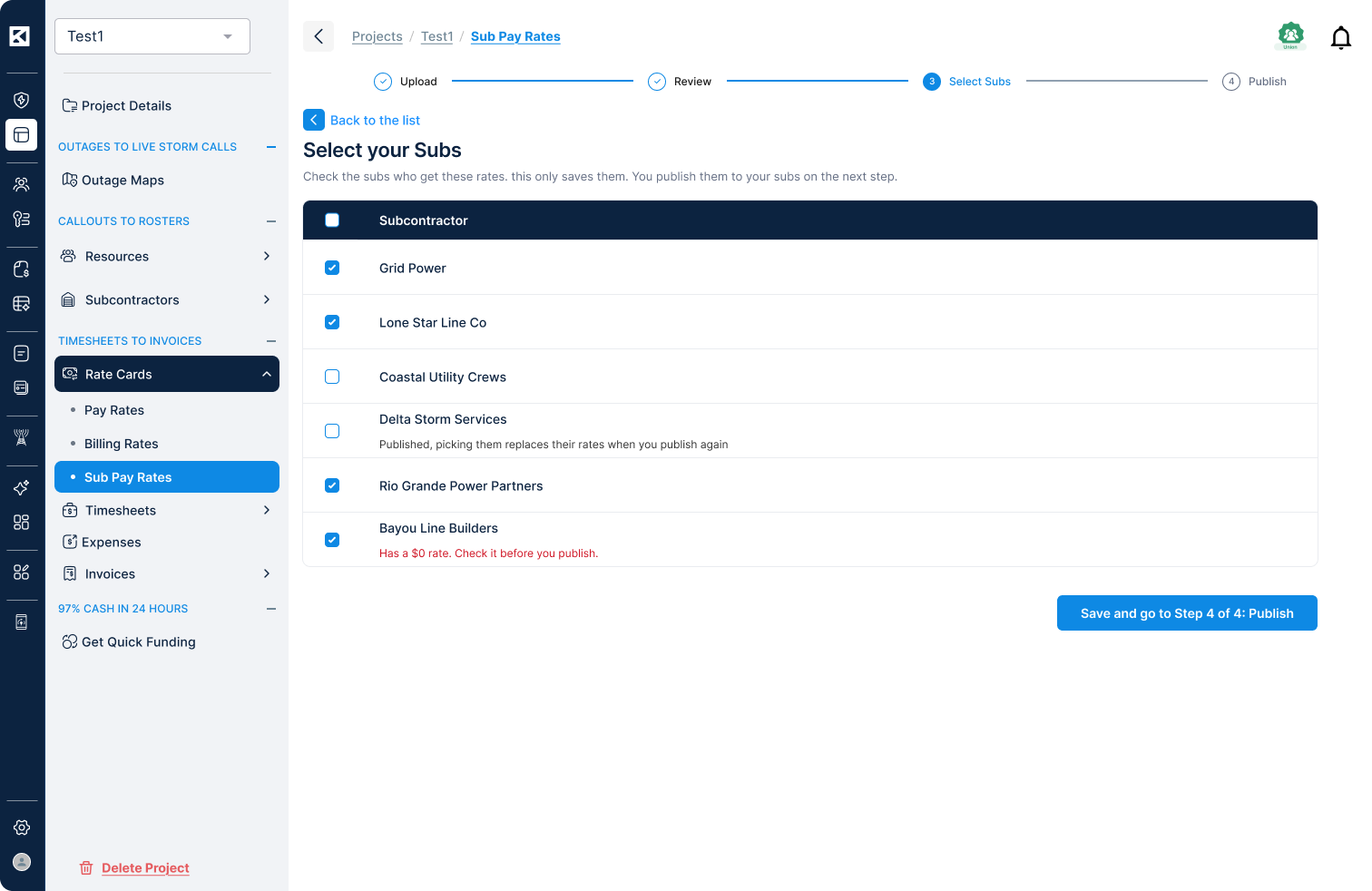
With the rate table confirmed, admins choose who receives it using a single checklist. You can select an individual subcontractor, a specific group, or the entire roster for that storm.
The system clearly distinguishes between subcontractors’ awaiting rates and those with live, published rates from previous rounds. Admins always know who an update affects before proceeding.
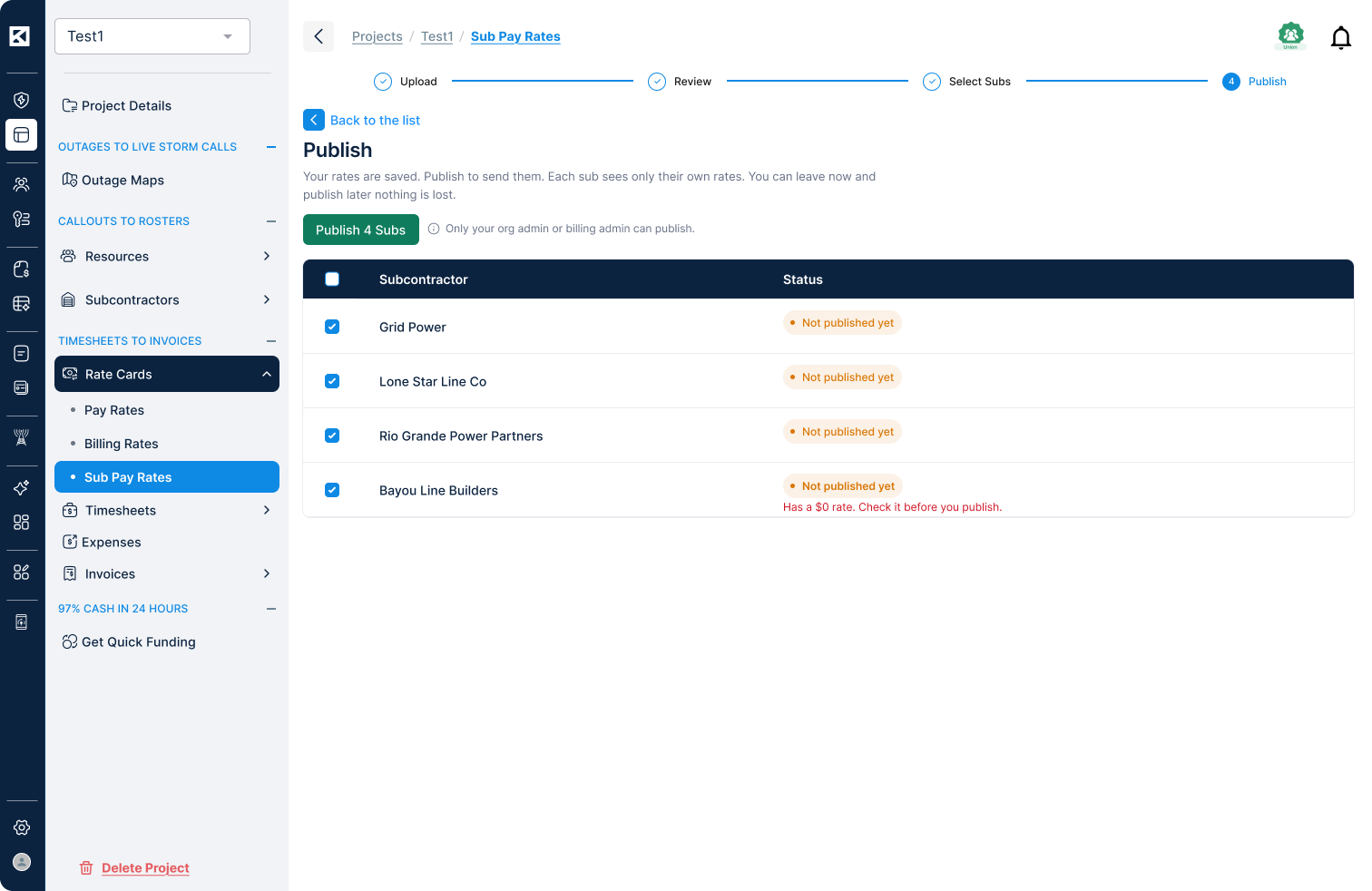
Publishing is the final, deliberate step that distributes rates. Everything prior (uploaded files, reviewed grids, and selected subcontractors) can be prepared and saved without any subcontractor seeing it.
This setup lets storm teams prepare pay rates well before landfall and hold them ready. When mobilization happens, publishing takes seconds, and each subcontractor sees only their own rates, never anyone else's. You get rapid storm response speeds without compromising payroll accuracy.
Storm response does not follow a 9-to-5 schedule, and pay rate management should not either. KYRO AI’s Sub Pay Rates feature was designed around the real rhythm of a storm response:
Fast, accurate subcontractor pay rate management directly impacts crew trust, invoice accuracy, and your ability to scale operations during emergencies.
By centralizing and automating the rate-setting process, utilities drastically reduce the calculation errors that plague manual invoice processing. This creates a standardized digital rate log that simplifies State Public Utility Commission (PUC) line-item labor verification requirements and aligns directly with American Public Power Association (APPA) benchmarks for fair, transparent contractor compensation.
When crews trust their pay rates upfront, billing disputes drop and teams deploy faster. When admins manage and adjust rates in minutes instead of hours, your workforce can focus on power restoration instead of chasing spreadsheet errors.
The Sub Pay Rates feature is one part of a complete platform built to manage the full storm restoration workforce lifecycle, from roster building and callouts to timesheets and invoicing, all in one place.
Ready to see how KYRO AI can simplify your next storm response? Talk to our team to get a walkthrough of Sub Pay Rates and the rest of the KYRO AI platform.