.jpeg)
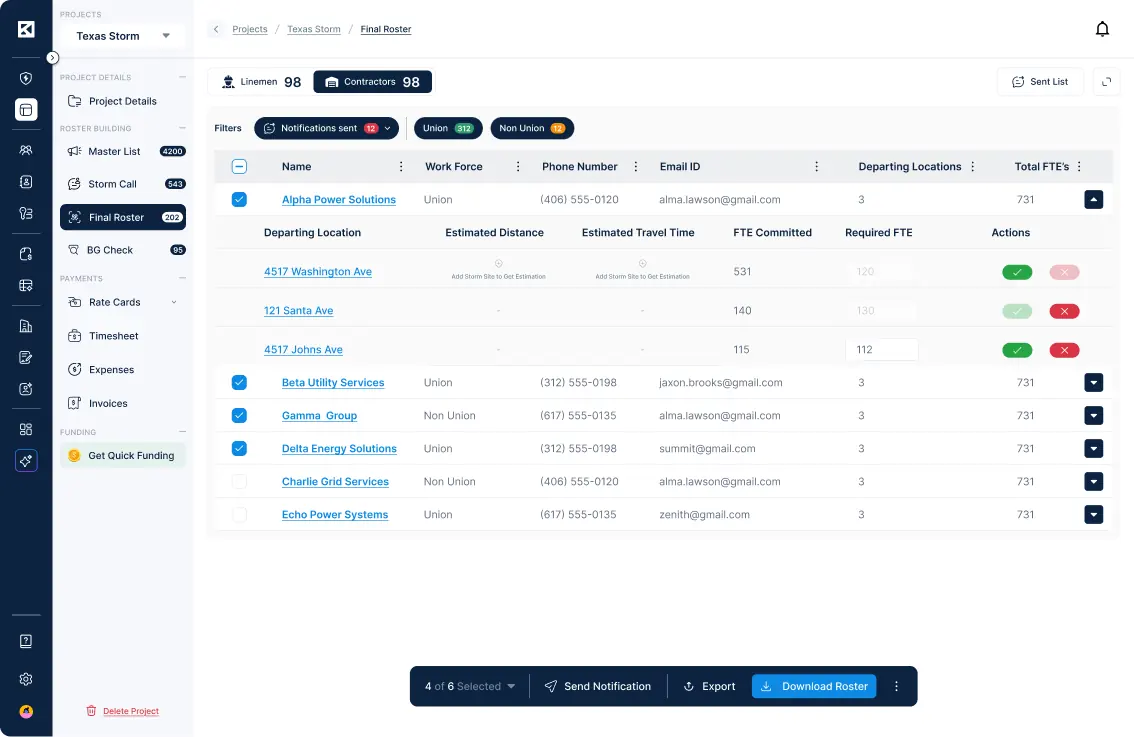
When a Contractor invites a Subcontractor to a storm in KYRO AI, one of the most critical handoffs in the onboarding workflow is the crew list. The Sub needs to tell the Contractor exactly who they're bringing, and KYRO AI gives them two ways to provide it: build the roster row-by-row using the in-app roster builder, or upload it as an Excel roster file. Whichever method the Sub chooses, the Contractor can access the result without leaving the platform. If the Sub builds the roster in-app, the Contractor views it directly inside KYRO AI. If the Sub uploads an Excel file, the Contractor clicks Download to retrieve the uploaded roster.
This means the entire document exchange during storm mobilization, from the initial invite through the subcontractor crew list download, stays inside a single system. This article covers who the feature serves, how to use it, and why that containment matters.
The roster download serves two groups.
Contractors who have invited Subs to a storm and need to retrieve the roster file the Sub provided. Rather than requesting it through a separate channel, the Contractor pulls the Sub's roster directly from within the platform the moment it is available.
Subcontractors who upload their crew list as an Excel file and want confidence that the Contractor can access it without any additional steps. Once the Sub uploads, the file is available on the Contractor's side automatically — no follow-up needed.
The roster download is part of the standard subcontractor onboarding flow. No additional setup or configuration is required.
Storm onboarding moves fast, and the roster is one of the documents that needs to land cleanly between the Contractor and the Sub. Keeping both the upload and the retrieval inside a single platform matters for three reasons.
Every document in the subcontractor onboarding process — the NTP, the rate sheet, the availability form, and the uploaded crew list — lives and moves within KYRO AI. There is no step in the chain that forces either party out of the platform. The Sub uploads; the Contractor downloads. That's the complete handoff.
When rosters travel through email threads, outdated copies inevitably surface. A Sub updates the roster, but the Contractor may still be referencing a version they received in a message days earlier. Because the file lives in one place, both parties are always looking at the same document. If the Sub re-uploads, the Contractor retrieves the current version from the same location.
The roster submission and the roster download both happen inside the platform, which means KYRO AI serves as the record of what was provided and when. This is particularly valuable during storm onboarding, when timelines are compressed and accountability matters.
If your organization uses KYRO AI for subcontractor onboarding, the roster download is already part of the standard workflow. No additional setup is required. When a Sub uploads a roster as an Excel file, the Download button appears in the Contractor's view automatically.
For questions about this feature or subcontractor onboarding, register for a live webinar with us!

When a Contractor invites a Subcontractor to a storm in KYRO AI, one of the most critical handoffs in the onboarding workflow is the crew list. The Sub needs to tell the Contractor exactly who they're bringing, and KYRO AI gives them two ways to provide it: build the roster row-by-row using the in-app roster builder, or upload it as an Excel roster file. Whichever method the Sub chooses, the Contractor can access the result without leaving the platform. If the Sub builds the roster in-app, the Contractor views it directly inside KYRO AI. If the Sub uploads an Excel file, the Contractor clicks Download to retrieve the uploaded roster.
This means the entire document exchange during storm mobilization, from the initial invite through the subcontractor crew list download, stays inside a single system. This article covers who the feature serves, how to use it, and why that containment matters.
The roster download serves two groups.
Contractors who have invited Subs to a storm and need to retrieve the roster file the Sub provided. Rather than requesting it through a separate channel, the Contractor pulls the Sub's roster directly from within the platform the moment it is available.
Subcontractors who upload their crew list as an Excel file and want confidence that the Contractor can access it without any additional steps. Once the Sub uploads, the file is available on the Contractor's side automatically — no follow-up needed.
The roster download is part of the standard subcontractor onboarding flow. No additional setup or configuration is required.

Storm onboarding moves fast, and the roster is one of the documents that needs to land cleanly between the Contractor and the Sub. Keeping both the upload and the retrieval inside a single platform matters for three reasons.
Every document in the subcontractor onboarding process — the NTP, the rate sheet, the availability form, and the uploaded crew list — lives and moves within KYRO AI. There is no step in the chain that forces either party out of the platform. The Sub uploads; the Contractor downloads. That's the complete handoff.
When rosters travel through email threads, outdated copies inevitably surface. A Sub updates the roster, but the Contractor may still be referencing a version they received in a message days earlier. Because the file lives in one place, both parties are always looking at the same document. If the Sub re-uploads, the Contractor retrieves the current version from the same location.
The roster submission and the roster download both happen inside the platform, which means KYRO AI serves as the record of what was provided and when. This is particularly valuable during storm onboarding, when timelines are compressed and accountability matters.
If your organization uses KYRO AI for subcontractor onboarding, the roster download is already part of the standard workflow. No additional setup is required. When a Sub uploads a roster as an Excel file, the Download button appears in the Contractor's view automatically.
For questions about this feature or subcontractor onboarding, register for a live webinar with us!

David Garcia is a Product Manager at KYRO AI, where he leads the platform’s roadmap across Storm Restoration, Vegetation Management, and Construction Management. With a background in Customer Success, he brings a field-first perspective shaped by close work with crews and operators, focusing on building AI-driven technology—like StormShield and KORY—that works in real-world conditions.