Cash flow is the difference between a crew that runs and a crew that stalls. You've finished the work. Your timesheets are in. Your invoice is approved. And then you wait for 30, 60 and sometimes even 90.
Meanwhile, payroll is due, fuel costs are stacking up and vendors are calling. But none of them care about your AR aging report.
This is one of the most common pain points we hear from contractors and subcontractors on KYRO AI. Crews finish the work, submit clean invoices, get them approved, and then sit on their hands while the payment term runs out. That gap between approved and paid is where good contractors get stuck.
That's exactly why KYRO Capital exists. It gives you access to working capital on your approved invoices, so you're not waiting 30 to 90 days to put that money to work. The work is done, the invoice is approved, and the cash should follow. KYRO Capital makes sure it does.
Open any project in KYRO AI and you'll see the Get Quick Funding tab. This is where KYRO Capital lives.
KYRO Capital connects you directly to a working capital provider who can advance cash on your approved invoices. If you're already using KYRO AI's timesheets and invoices module, your data upload and invoice generation are already taken care of, so getting to a fundable invoice is that much faster.
Here's the logic. You've generated an invoice. Your client has approved it. That makes it a known receivable with a known payoff date.
A working capital provider can look at that invoice and typically advance 80% to 90% of its value — minus fees — and then collect from your client when the original payment term comes due.
You get the cash now. Your client pays on the same schedule they always would. No more sitting around waiting for the full payment term to run out.
The first time you open the Get Quick Funding tab, you'll see the KYRO Capital banner with an Apply for Contract button.
Below the banner is a list of invoices you've already generated and gotten approved. Those are the ones eligible for funding once your application goes through.

Tap the button, and a short application walks you through six steps:
The whole process takes a few minutes. Once submitted, the application goes directly to our working capital provider.
From there, anything the provider needs — questions, follow-ups, the approval decision, signed agreements — happens between you and them. KYRO AI makes the introduction. The rest is yours.
Once the working capital provider approves your application, the Get Quick Funding tab changes. Every approved invoice now has a Get Funded button next to it.
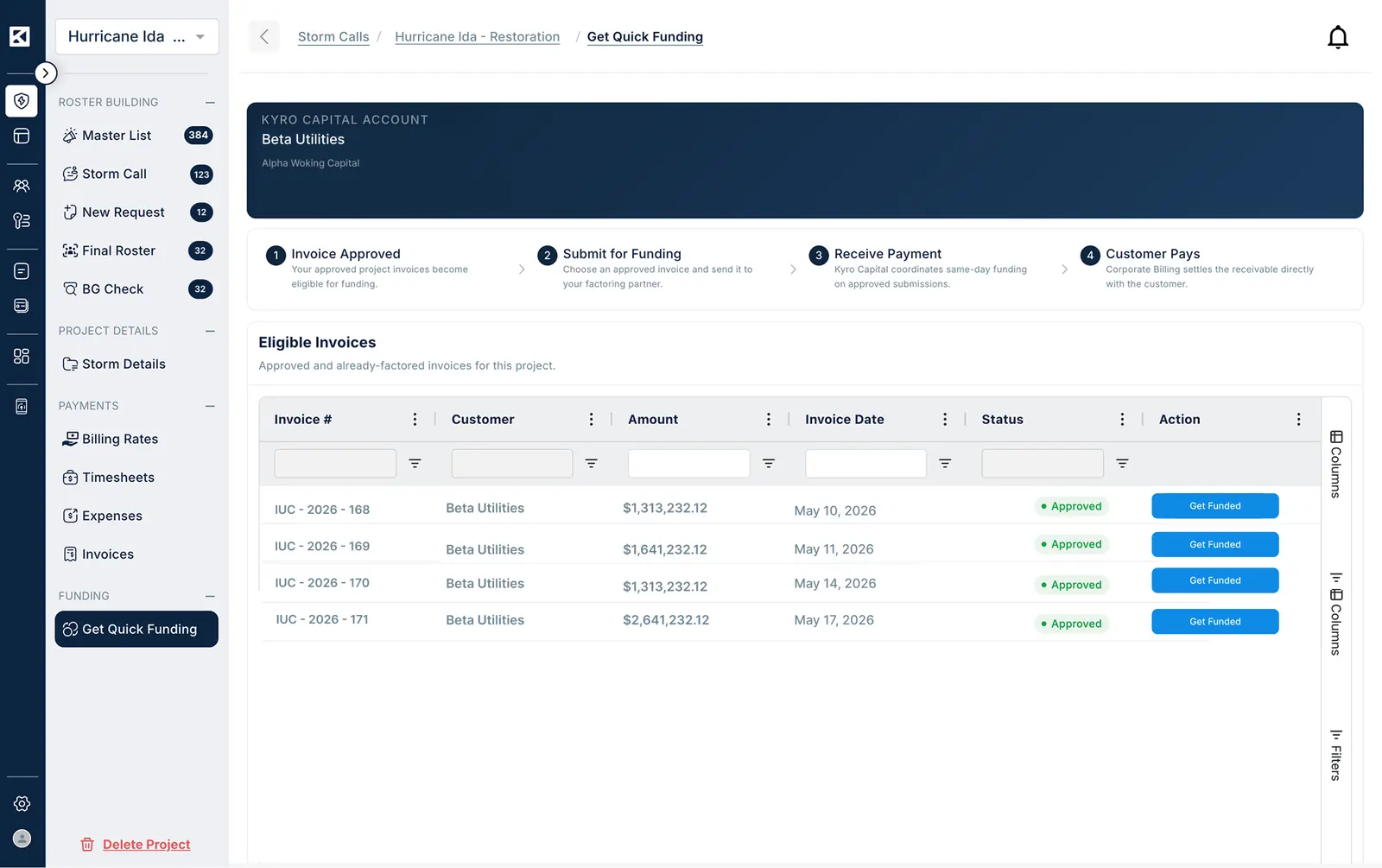
Tap it on any invoice you want to advance. KYRO AI sends the invoice along with a copy of your application to the working capital provider, and they take it from there. Coordination, payment, and any further paperwork all happen directly between you and the provider.
Here's the important part: you don't re-apply for each invoice. One application gets you set up. After that, it's one button per invoice, only when you actually need the cash. If you don't need funding on a particular invoice, you don't tap the button.
There are no obligations, no recurring commitments, and no pressure to use it on every invoice you generate.
KYRO AI gives you the on-ramp. Your approved invoices and your completed application packaged up and placed in front of a working capital provider. No hunting one down on your own. No shopping around. No rebuilding the same paperwork every time you need cash sooner.
To be clear, KYRO AI doesn't advance the funds, and we don't set the funding terms. The financial agreement — advance amount, fees, timelines, repayment — is between you and the working capital provider. It's yours to review and agree to before you sign anything.
Before you sign a funding agreement, make sure you understand three things: the advance rate (what percentage of the invoice you'll receive upfront), the fee structure (what the working capital provider charges for the service), and the repayment terms (when and how the balance is settled once your client pays). These details vary by provider and by invoice, so take the time to read through them. KYRO AI gets you in front of the provider — but the agreement is yours to evaluate.
Beyond providing access to working capital, the invoicing screen itself is designed to keep things simple. The information you need is easy to find, and the actions you take most often are front and center.
If invoicing already works well for you, nothing changes. The layout is built to stay out of your way.
For storm work especially, the gap between finishing a job and actually seeing the money is where good crews get squeezed. Payment terms in this industry typically run 30 to 90 days, sometimes longer. That's a long time to float payroll and operating costs out of your own pocket — especially when the next callout is already coming in and you need to mobilize again.
The math is straightforward. If you've got $200,000 in approved invoices sitting in a 60-day payment cycle, that's $200,000 you can't use to cover crew costs, equipment, fuel, or materials for the next job. Working capital access changes that equation.
According to the Deloitte 2026 Power and Utilities Outlook, utilities are deploying mutual aid resources more frequently, with higher contractor readiness expectations. The contractors who grow in that environment are not necessarily the ones with the largest crews. They're the ones who mobilize fast, bill clean, and maintain working capital access back-to-back across a full season.
If you've ever passed on a callout because the math didn't work or sweated a payroll while waiting on a check — this is built for you. Apply once, use it on the invoices that qualify, and stop letting payment terms decide which jobs you can take.
The Get Quick Funding tab is live inside every project. Find the KYRO Capital banner, tap Apply for Funding, and get access to working capital when you need it.
Am I taking on debt if I use this?
No. KYRO Capital provides access to working capital through invoice factoring — meaning you're accessing funds against verified invoices for work already completed, not taking on a loan. Funding can range typically from 80% to 90% of the invoice value, minus fees. The verified audit trail KYRO AI generates is what enables lenders to fund faster.
I'm a small sub, can I even use this?
Yes. KYRO Capital is designed for contractors of all sizes — from subcontractors to large prime contractors. Talk to the KYRO AI team about your specific situation.
What if I'm only interested in KYRO Capital, do I need to use the full platform?
No. KYRO AI is built to be used module by module, so you can use KYRO Capital on its own if faster funding is your immediate priority. That said, the more of the platform you use — GPS-verified timesheets, AI-validated expenses, the end-to-end audit trail — the stronger the verified data backing your invoices, which is what gives funders the confidence to fund faster. Start with what you need, and the rest is there when you're ready.

Cash flow is the difference between a crew that runs and a crew that stalls. You've finished the work. Your timesheets are in. Your invoice is approved. And then you wait for 30, 60 and sometimes even 90.
Meanwhile, payroll is due, fuel costs are stacking up and vendors are calling. But none of them care about your AR aging report.
This is one of the most common pain points we hear from contractors and subcontractors on KYRO AI. Crews finish the work, submit clean invoices, get them approved, and then sit on their hands while the payment term runs out. That gap between approved and paid is where good contractors get stuck.
That's exactly why KYRO Capital exists. It gives you access to working capital on your approved invoices, so you're not waiting 30 to 90 days to put that money to work. The work is done, the invoice is approved, and the cash should follow. KYRO Capital makes sure it does.
Open any project in KYRO AI and you'll see the Get Quick Funding tab. This is where KYRO Capital lives.
KYRO Capital connects you directly to a working capital provider who can advance cash on your approved invoices. If you're already using KYRO AI's timesheets and invoices module, your data upload and invoice generation are already taken care of, so getting to a fundable invoice is that much faster.
Here's the logic. You've generated an invoice. Your client has approved it. That makes it a known receivable with a known payoff date.
A working capital provider can look at that invoice and typically advance 80% to 90% of its value — minus fees — and then collect from your client when the original payment term comes due.
You get the cash now. Your client pays on the same schedule they always would. No more sitting around waiting for the full payment term to run out.
The first time you open the Get Quick Funding tab, you'll see the KYRO Capital banner with an Apply for Contract button.
Below the banner is a list of invoices you've already generated and gotten approved. Those are the ones eligible for funding once your application goes through.

Tap the button, and a short application walks you through six steps:
The whole process takes a few minutes. Once submitted, the application goes directly to our working capital provider.
From there, anything the provider needs — questions, follow-ups, the approval decision, signed agreements — happens between you and them. KYRO AI makes the introduction. The rest is yours.
Once the working capital provider approves your application, the Get Quick Funding tab changes. Every approved invoice now has a Get Funded button next to it.

Tap it on any invoice you want to advance. KYRO AI sends the invoice along with a copy of your application to the working capital provider, and they take it from there. Coordination, payment, and any further paperwork all happen directly between you and the provider.
Here's the important part: you don't re-apply for each invoice. One application gets you set up. After that, it's one button per invoice, only when you actually need the cash. If you don't need funding on a particular invoice, you don't tap the button.
There are no obligations, no recurring commitments, and no pressure to use it on every invoice you generate.
KYRO AI gives you the on-ramp. Your approved invoices and your completed application packaged up and placed in front of a working capital provider. No hunting one down on your own. No shopping around. No rebuilding the same paperwork every time you need cash sooner.
To be clear, KYRO AI doesn't advance the funds, and we don't set the funding terms. The financial agreement — advance amount, fees, timelines, repayment — is between you and the working capital provider. It's yours to review and agree to before you sign anything.
Before you sign a funding agreement, make sure you understand three things: the advance rate (what percentage of the invoice you'll receive upfront), the fee structure (what the working capital provider charges for the service), and the repayment terms (when and how the balance is settled once your client pays). These details vary by provider and by invoice, so take the time to read through them. KYRO AI gets you in front of the provider — but the agreement is yours to evaluate.
Beyond providing access to working capital, the invoicing screen itself is designed to keep things simple. The information you need is easy to find, and the actions you take most often are front and center.
If invoicing already works well for you, nothing changes. The layout is built to stay out of your way.
For storm work especially, the gap between finishing a job and actually seeing the money is where good crews get squeezed. Payment terms in this industry typically run 30 to 90 days, sometimes longer. That's a long time to float payroll and operating costs out of your own pocket — especially when the next callout is already coming in and you need to mobilize again.
The math is straightforward. If you've got $200,000 in approved invoices sitting in a 60-day payment cycle, that's $200,000 you can't use to cover crew costs, equipment, fuel, or materials for the next job. Working capital access changes that equation.
According to the Deloitte 2026 Power and Utilities Outlook, utilities are deploying mutual aid resources more frequently, with higher contractor readiness expectations. The contractors who grow in that environment are not necessarily the ones with the largest crews. They're the ones who mobilize fast, bill clean, and maintain working capital access back-to-back across a full season.
If you've ever passed on a callout because the math didn't work or sweated a payroll while waiting on a check — this is built for you. Apply once, use it on the invoices that qualify, and stop letting payment terms decide which jobs you can take.
The Get Quick Funding tab is live inside every project. Find the KYRO Capital banner, tap Apply for Funding, and get access to working capital when you need it.
Am I taking on debt if I use this?
No. KYRO Capital provides access to working capital through invoice factoring — meaning you're accessing funds against verified invoices for work already completed, not taking on a loan. Funding can range typically from 80% to 90% of the invoice value, minus fees. The verified audit trail KYRO AI generates is what enables lenders to fund faster.
I'm a small sub, can I even use this?
Yes. KYRO Capital is designed for contractors of all sizes — from subcontractors to large prime contractors. Talk to the KYRO AI team about your specific situation.
What if I'm only interested in KYRO Capital, do I need to use the full platform?
No. KYRO AI is built to be used module by module, so you can use KYRO Capital on its own if faster funding is your immediate priority. That said, the more of the platform you use — GPS-verified timesheets, AI-validated expenses, the end-to-end audit trail — the stronger the verified data backing your invoices, which is what gives funders the confidence to fund faster. Start with what you need, and the rest is there when you're ready.

David Garcia is a Product Manager at KYRO AI, where he leads the platform’s roadmap across Storm Restoration, Vegetation Management, and Construction Management. With a background in Customer Success, he brings a field-first perspective shaped by close work with crews and operators, focusing on building AI-driven technology—like StormShield and KORY—that works in real-world conditions.