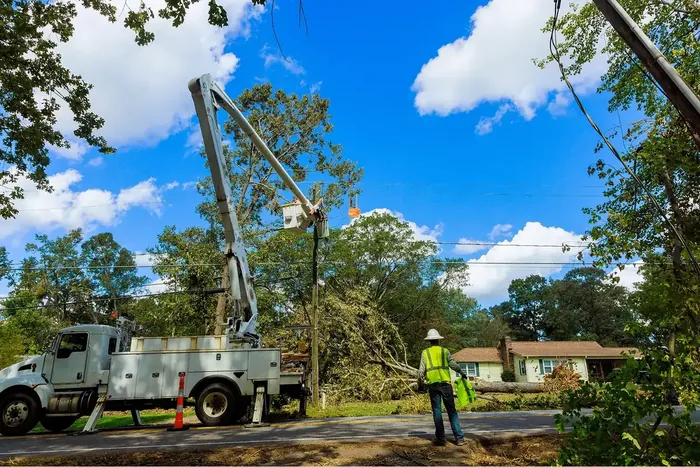
features that change storm contractor workflow

7 Features That Change Storm Contractor Workflows

April 9, 2026
11 min read

From smarter roster control to invoice approvals that work for everyone — here is what shipped and why it matters.

Executive Summary

Storm restoration moves fast. Utilities call contractors with little notice, contractors scramble to mobilize linemen and equipment, invoices are assembled by hand, and payments can drag on for months. Every manual step in that chain is a place where something goes wrong — a wrong number, a missed receipt, an invoice that gets rejected because it used the wrong reference type.

This release addresses seven of those pressure points. Three are in the roster-building and subcontractor workflow, where the work of assembling a capable crew happens. Four are in the invoice and payment flow, where that work gets turned into cash. Together they represent a meaningful reduction in the administrative weight that storm contractors carry every time the lights go out.

What This Update Covers

Feature 1  —  Exclude linemen from active rosters and blacklists during parallel storm calls

Feature 2  —  Blue sky capacity broadcasts: FTE and equipment counts in seconds

Feature 3  —  Subcontractor departing locations with real-time distance and travel time

Feature 4  —  Excel timesheet upload to invoice generation in minutes

Feature 5  —  Bulk expense receipt upload with AI-assisted scanning

Feature 6  —  Browser-based invoice approval for utilities not on KYRO

Feature 7  —  Full invoice audit trail with real-time status visibility

Part 1: Smarter Roster Building

Assembling the right crew for a storm call has always been a judgment call made under pressure. These three improvements give contractors more precision and more information exactly when they need it.

Feature 1: Exclude Linemen from Active Rosters and Blacklists

The Problem

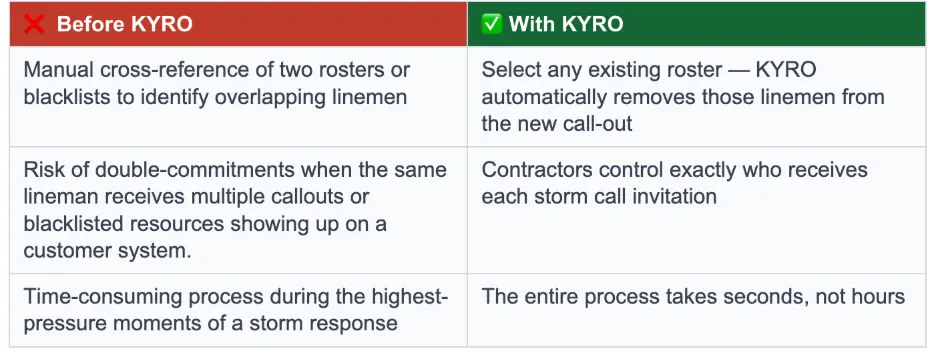
When two storm calls run in parallel — same contractor, same region, same general workforce — the call-out list for the second storm naturally overlaps with the first. A prime contractor working with a master list of 5,000 linemen may only need to exclude 40 of them: the 40 who are already deployed and working.  Other times, utilities and contractors may have blacklisted employees from their system for a variety of reasons.

Without tooling, that exclusion requires someone to manually cross-reference two rosters and scrub the list by hand. During a storm, that is time nobody has. And the cost of getting it wrong is real: a lineman already on an active roster who receives a call-out for a new storm may be tempted to abandon the current job for better pay on the next one, creating a double-commitment problem that hurts the contractor's reliability with the utility.

The Solution

When creating a new storm call, the contractor can now select any existing storm call or blacklist from their account and automatically exclude all linemen on that roster or blacklist from the new call-out. KYRO surfaces the count immediately: out of a 5,000-person master list, 40 are being removed, leaving 4,960 available for this call.

The control stays entirely with the contractor or project manager. Linemen are not notified, and the decision does not depend on the active status of the prior storm call. What used to require a manual cross-reference of two rosters now happens in a single selection.
Feature 2: Blue Sky Capacity Broadcasts

The Problem

Storm preparedness depends on knowing, in advance, what your network can actually deploy. A prime contractor needs to know how many linemen their subcontractors can commit on short notice, and how much equipment — bucket trucks, diggers, pickup trucks — is available and ready to mobilize.

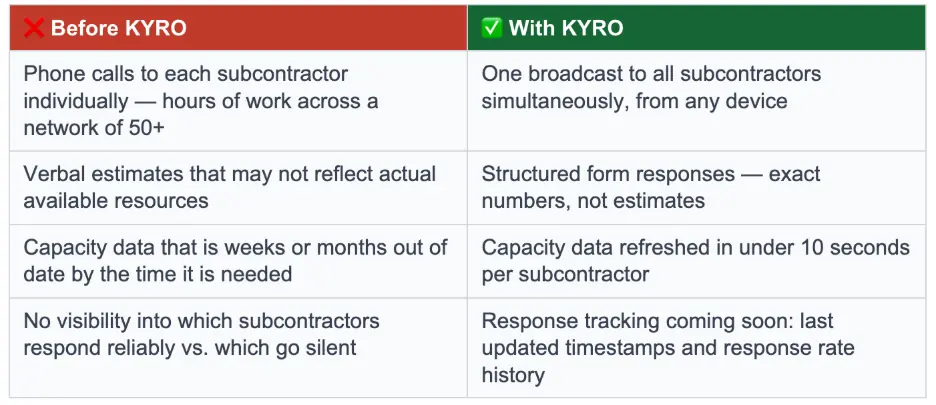
On a blue sky day, when there is no active storm, that information has typically been gathered through phone calls or text messages. A project manager calls or texts each subcontractor one by one, asks for a headcount and an equipment count, and records the answers manually. With 10 subcontractors, that is a morning's work. With 50 or 200, it becomes a process that nobody does consistently — which means the numbers contractors rely on for storm planning are often months out of date.

The answers themselves are imprecise. Whoever picks up the phone may not have the exact numbers in front of them. They give an estimate. That estimate goes into a spreadsheet. By the time a storm hits, the data no longer reflects reality.

The Solution

With one action, the prime contractor broadcasts a capacity request to all of their subcontractors at once. Each subcontractor receives the request as a push notification, an email, and an in-app message. The form is intentionally minimal: total FTE count, bucket trucks, diggers, and pickups. Four fields. The subcontractor fills it out and submits in under 10 seconds.

The prime's dashboard updates immediately. Every subcontractor's response appears in one view, with a running total of committed headcount and equipment across the entire network. This same feature works upward in the chain: utilities managing a network of prime contractors can use the same broadcast to understand mobilization capacity before a storm arrives, rather than relying on head counts from an RFP signed five years earlier.

Response tracking — last updated timestamps, response rates by subcontractor — is on the near-term roadmap. Subcontractors who consistently ignore capacity requests will be visible in the data, giving prime contractors actionable information about who to prioritize when the next storm hits.
Feature 3: Subcontractor Departing Locations with Real-Time Travel Distance

The Problem

When a prime contractor asks a subcontractor to commit crews to a storm call, the commitment is only meaningful if those crews can actually get to the storm site in time. Mobilization time is one of the most critical inputs a prime contractor uses when deciding which subcontractors to bring on, and which yard to mobilize from when a subcontractor operates out of multiple locations.

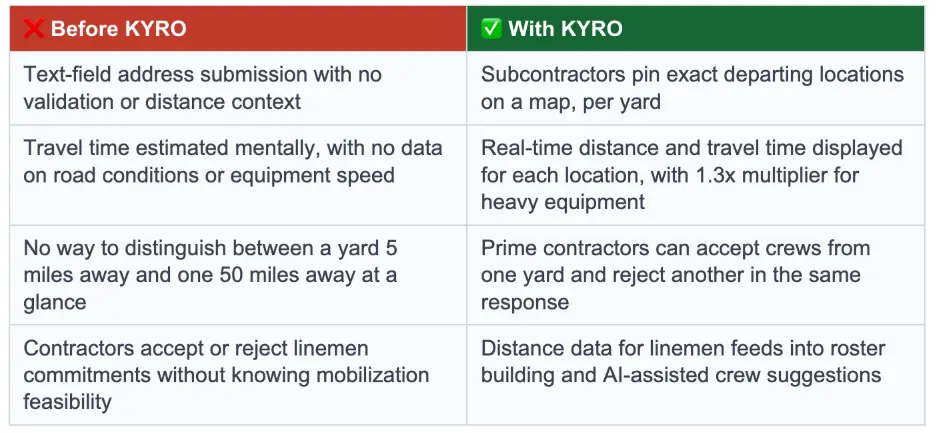
Until now, that decision was guesswork. Subcontractors would submit a text-field address and a crew count. The prime would mentally estimate how far that was from the storm site. They had no real distance data, no travel time information, and no way to account for the fact that bucket trucks and heavy equipment travel significantly slower than passenger vehicles — a factor that utilities typically handle by multiplying standard map travel times by 1.3.

The Solution

When a subcontractor responds to a storm call availability request, they can now pin their exact departing location on a map — and add multiple locations if they operate out of more than one yard. Each pinned location comes with a crew count and equipment count for that specific yard.

The prime contractor's view shows the distance and estimated travel time between each departing location and the storm site, calculated in real time. For heavy equipment mobilizations, KYRO applies the 1.3x travel time multiplier that utilities use in their planning standards. If a yard is 1.2 miles away with a 7-minute estimated travel time, the prime sees that. If another yard is 11.6 miles away with a 51-minute travel time, the prime sees that too — and can reject that specific location while still accepting the committed crews from the closer one.

This same distance intelligence applies to linemen during roster building. Because KYRO has location information on file for the majority of linemen in the system, the platform can surface how close each individual is to the storm site as the roster is being built — enabling faster, more informed decisions about who to deploy first. This capability will also feed into KYRO's AI-assisted roster suggestions, where the system pre-filters candidates based on proximity and other criteria.
Part 2: From Timesheets to Approved Invoices

The payment side of storm work is where the most time gets lost. Timesheets go into spreadsheets. Spreadsheets become invoices. Invoices sit in email inboxes. Approvals get delayed because the reviewer is not on the platform. Funding partners advance capital against invoices without knowing whether the utility has actually approved them. These four features address that chain end to end.

Feature 4: Excel Timesheet Upload with Automatic Invoice Generation

The Problem

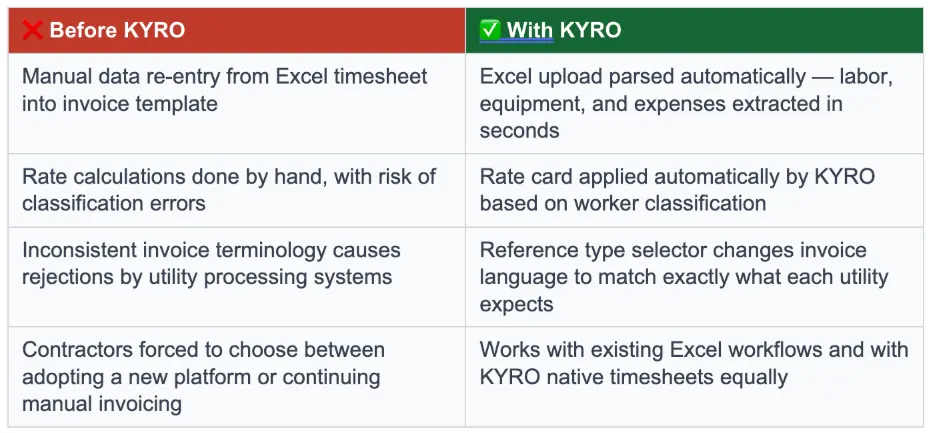
The standard process for generating a storm invoice starts with a timesheet — and most contractors are still tracking time in Excel. A foreman records crew hours, equipment usage, and expenses in a spreadsheet. That spreadsheet goes to an office manager, who manually transfers the data into an invoice template. The invoice is then formatted, cross-referenced against the rate card, and sent to the utility or prime for approval.

That process introduces multiple points of failure. Data gets re-entered by hand, which means it gets re-entered incorrectly. Rate calculations are done manually, so classification errors go undetected. The final invoice often uses inconsistent terminology — one contractor calls it a Purchase Order number, the utility's AI processing system expects a Work Authorization number — and gets kicked back, delaying payment by days or weeks.

For contractors who have not yet adopted KYRO's native crew timesheets, requiring a full system migration just to generate an invoice creates unnecessary friction. The goal is to meet contractors where they are.

The Solution

Contractors can now upload their Excel timesheet directly into KYRO using a standardized format. KYRO parses the file and extracts labor data by individual lineman, equipment usage by type and rate, and all expense line items — automatically, in seconds. The result is a complete invoice draft populated with linemen time and associated billing, equipment entries and associated billing, and expense lines, associated billing and receipt backup, without a single manual data entry.

From there, the contractor reviews the parsed data and fills in the invoice header: date, payment terms (Net 30, 60, or 90), reference type, and reference number. The reference type selection is intentionally precise — the label on the invoice changes to match exactly what the utility expects to see. If a utility requires a “Work Authorization” field and the contractor submits an invoice labeled “Purchase Order”, the utility's automated processing system may reject it outright. KYRO ensures the language is right before the invoice leaves the system.

Contractors who do capture timesheets natively in KYRO can convert them to invoices with a single click, bypassing the upload step entirely. Both paths lead to the same place: a complete, accurate invoice ready for approval.
Feature 5: Bulk Expense Receipt Upload with AI-Assisted Scanning

The Problem

Storm restoration generates an enormous volume of small expenses: gas receipts, hotel stays, meals, tool purchases, and supply runs. Contractors are required to submit receipts as supporting documentation with their invoices. In practice, that means someone — usually not the person who made the purchase — is responsible for collecting, labeling, scanning, and attaching dozens or hundreds of individual receipts to an invoice package.

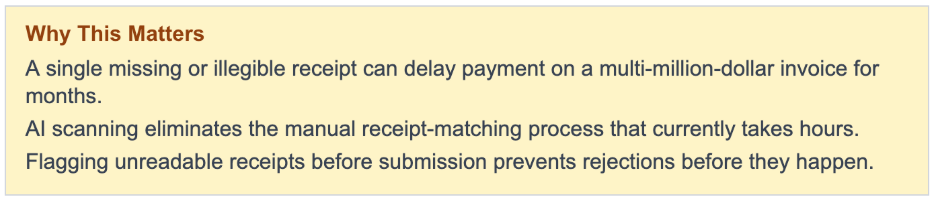
The consequences of getting this wrong are severe. A utility reviewing a $50 million invoice will hold payment for months if a single receipt for a $50 charge is missing, illegible, or attached without a matching line item. This is not hypothetical — it is a routine cause of invoice disputes that extends payment timelines by weeks or months, creating serious cash flow pressure for contractors who are already waiting on Net 60 or Net 90 terms.

The Solution

Contractors can now collect all their expense receipts — photographed, scanned, or downloaded — into a single zip folder and upload it at once. KYRO uses two AI models (one acting as a backup validation) in parallel to scan and categorize each receipt, matching it to the corresponding expense line item and flagging any receipts that cannot be read clearly.

The result is a clean, organized expense package attached to the invoice automatically. Receipts that the AI cannot process confidently with a greater than 80% certainty are surfaced with a warning, so the contractor can review and correct them before the invoice goes out — not after the utility has already rejected it. Individual receipt uploads remain supported for contractors who prefer to manage receipts one by one.
Feature 6: Browser-Based Invoice Approval for Non-KYRO Users

The Problem

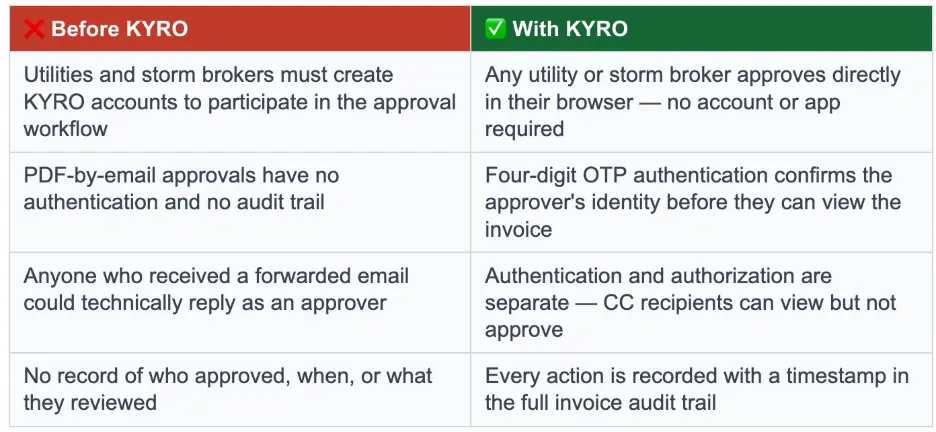
Storm contractors work with utilities and storm brokers who will never adopt a contractor's operational platform. A contractor using KYRO cannot assume that a utility or storm broker has created an account, configured permissions, or trained their team on the approval workflow. Requiring utilities or storm brokers to join KYRO in order to approve an invoice effectively breaks the approval chain for the majority of jobs.

At the same time, emailing an invoice as a PDF attachment and waiting for a reply creates a different problem: there is no security, no audit trail, and no guarantee that the person who replied had the authority to approve. Anyone who forwarded the email could respond. The contractor has no record of who reviewed the invoice, when they reviewed it, or whether the approval is legitimate.

The Solution

When a contractor sends an invoice for approval, the designated approver receives an email with a link. Clicking the link renders the full invoice in their browser — no KYRO account required. Before they can view the invoice, they are prompted to authenticate with a four-digit one-time code sent to their registered contact. This confirms they are who they say they are.

Authentication and authorization are handled separately. A utility or storm broker may copy multiple people on the approval request, but only the designated approver has the authority to approve or request a correction. Others on the copy can view the invoice but cannot take action on it. Every action — viewed, approved, correction requested — is recorded in the audit trail with a timestamp.

The result is an approval process that is accessible to any utility or storm broker, secured against unauthorized access, and fully documented. Utilities and storm brokers do not need to change how they work. The invoice comes to them.
Feature 7: Invoice Audit Trail with Real-Time Status Visibility

The Problem

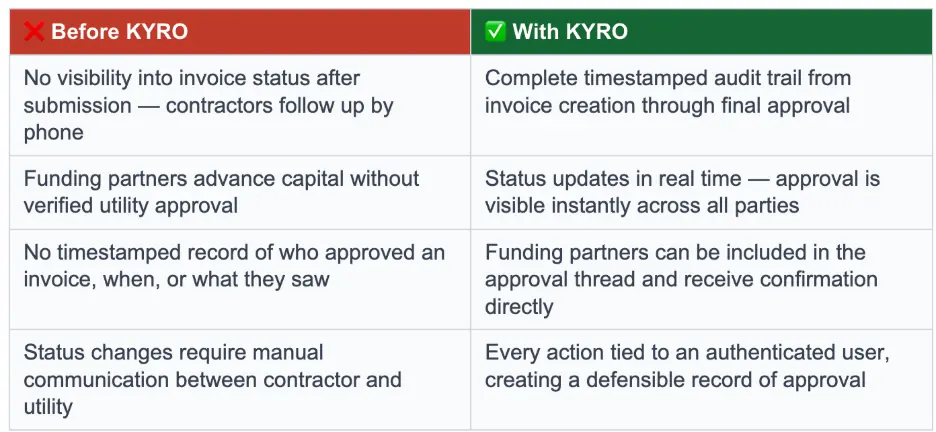
Once a contractor submits an invoice for approval, visibility disappears. They know it was sent. They do not know whether it was opened, whether the right person received it, or whether it is sitting in an inbox waiting to be looked at. Following up means another email or a phone call — and the answer is often "I think someone is looking at it."

QuickPay funding partners have the same problem from the other direction. When a contractor submits an invoice for early payment, the funding partner needs to know whether the utility has actually approved it. Without that confirmation, they are taking on risk they have no way to quantify. Some funding partners are currently advancing capital without verified approval — a practice that cannot scale sustainably.

The Solution

Every invoice in KYRO now has a complete, timestamped audit trail. The trail records every state the invoice passes through: created, submitted, viewed by the approver, approved, correction requested, and any reassignments or escalations. The status updates in real time — when the utility clicks approve, the contractor's dashboard reflects that change immediately, without a page refresh.

For funding partners, this trail is the verification layer they have been missing. A contractor can include the funding partner's contact on the approval workflow so that they receive the approval notification directly and in real time. When a funding partner can see, with a timestamp, that the utility has approved an invoice, the risk calculation changes. The approval is documented, dated, and tied to an authenticated user — not just a reply-to-all email that anyone could have sent.
Conclusion

Each of these seven features was built in response to a specific failure point in how storm work gets done today. Some of them save minutes. Some of them save months. But they share a common design principle: the platform should absorb the complexity that contractors currently carry in their heads, in their spreadsheets, and in their phone call logs.

Running parallel storm calls without double-booking workers. Avoid sending blacklisted employees to a utility system.  Understanding subcontractor capacity before a storm makes landfall. Knowing whether a yard is minutes or hours from the storm site. Generating a complete, accurate invoice from an Excel file in under 2 minutes. Getting paid without a missing receipt holding up a $50 million check. Approving an invoice securely from a web browser without creating an account. Knowing, at any moment, exactly where an invoice stands.

None of these things are complicated on their own. But the absence of tooling to support them has made storm restoration more expensive, more uncertain, and more paper-dependent than it needs to be. KYRO is building the platform that removes those constraints — one feature at a time, every release, informed by the contractors, storm brokers and utilities who are doing this work every day.

7 Features That Change Storm Contractor Workflows

April 9, 2026
11 min read
April 15, 2026
David Garcia
Product Manager
Author
David Garcia
Product Manager

From smarter roster control to invoice approvals that work for everyone — here is what shipped and why it matters.

Executive Summary

Storm restoration moves fast. Utilities call contractors with little notice, contractors scramble to mobilize linemen and equipment, invoices are assembled by hand, and payments can drag on for months. Every manual step in that chain is a place where something goes wrong — a wrong number, a missed receipt, an invoice that gets rejected because it used the wrong reference type.

This release addresses seven of those pressure points. Three are in the roster-building and subcontractor workflow, where the work of assembling a capable crew happens. Four are in the invoice and payment flow, where that work gets turned into cash. Together they represent a meaningful reduction in the administrative weight that storm contractors carry every time the lights go out.

What This Update Covers

Feature 1  —  Exclude linemen from active rosters and blacklists during parallel storm calls

Feature 2  —  Blue sky capacity broadcasts: FTE and equipment counts in seconds

Feature 3  —  Subcontractor departing locations with real-time distance and travel time

Feature 4  —  Excel timesheet upload to invoice generation in minutes

Feature 5  —  Bulk expense receipt upload with AI-assisted scanning

Feature 6  —  Browser-based invoice approval for utilities not on KYRO

Feature 7  —  Full invoice audit trail with real-time status visibility

Part 1: Smarter Roster Building

Assembling the right crew for a storm call has always been a judgment call made under pressure. These three improvements give contractors more precision and more information exactly when they need it.

Feature 1: Exclude Linemen from Active Rosters and Blacklists

The Problem

When two storm calls run in parallel — same contractor, same region, same general workforce — the call-out list for the second storm naturally overlaps with the first. A prime contractor working with a master list of 5,000 linemen may only need to exclude 40 of them: the 40 who are already deployed and working.  Other times, utilities and contractors may have blacklisted employees from their system for a variety of reasons.

Without tooling, that exclusion requires someone to manually cross-reference two rosters and scrub the list by hand. During a storm, that is time nobody has. And the cost of getting it wrong is real: a lineman already on an active roster who receives a call-out for a new storm may be tempted to abandon the current job for better pay on the next one, creating a double-commitment problem that hurts the contractor's reliability with the utility.

The Solution

When creating a new storm call, the contractor can now select any existing storm call or blacklist from their account and automatically exclude all linemen on that roster or blacklist from the new call-out. KYRO surfaces the count immediately: out of a 5,000-person master list, 40 are being removed, leaving 4,960 available for this call.

The control stays entirely with the contractor or project manager. Linemen are not notified, and the decision does not depend on the active status of the prior storm call. What used to require a manual cross-reference of two rosters now happens in a single selection.

Feature 2: Blue Sky Capacity Broadcasts

The Problem

Storm preparedness depends on knowing, in advance, what your network can actually deploy. A prime contractor needs to know how many linemen their subcontractors can commit on short notice, and how much equipment — bucket trucks, diggers, pickup trucks — is available and ready to mobilize.

On a blue sky day, when there is no active storm, that information has typically been gathered through phone calls or text messages. A project manager calls or texts each subcontractor one by one, asks for a headcount and an equipment count, and records the answers manually. With 10 subcontractors, that is a morning's work. With 50 or 200, it becomes a process that nobody does consistently — which means the numbers contractors rely on for storm planning are often months out of date.

The answers themselves are imprecise. Whoever picks up the phone may not have the exact numbers in front of them. They give an estimate. That estimate goes into a spreadsheet. By the time a storm hits, the data no longer reflects reality.

The Solution

With one action, the prime contractor broadcasts a capacity request to all of their subcontractors at once. Each subcontractor receives the request as a push notification, an email, and an in-app message. The form is intentionally minimal: total FTE count, bucket trucks, diggers, and pickups. Four fields. The subcontractor fills it out and submits in under 10 seconds.

The prime's dashboard updates immediately. Every subcontractor's response appears in one view, with a running total of committed headcount and equipment across the entire network. This same feature works upward in the chain: utilities managing a network of prime contractors can use the same broadcast to understand mobilization capacity before a storm arrives, rather than relying on head counts from an RFP signed five years earlier.

Response tracking — last updated timestamps, response rates by subcontractor — is on the near-term roadmap. Subcontractors who consistently ignore capacity requests will be visible in the data, giving prime contractors actionable information about who to prioritize when the next storm hits.

Feature 3: Subcontractor Departing Locations with Real-Time Travel Distance

The Problem

When a prime contractor asks a subcontractor to commit crews to a storm call, the commitment is only meaningful if those crews can actually get to the storm site in time. Mobilization time is one of the most critical inputs a prime contractor uses when deciding which subcontractors to bring on, and which yard to mobilize from when a subcontractor operates out of multiple locations.

Until now, that decision was guesswork. Subcontractors would submit a text-field address and a crew count. The prime would mentally estimate how far that was from the storm site. They had no real distance data, no travel time information, and no way to account for the fact that bucket trucks and heavy equipment travel significantly slower than passenger vehicles — a factor that utilities typically handle by multiplying standard map travel times by 1.3.

The Solution

When a subcontractor responds to a storm call availability request, they can now pin their exact departing location on a map — and add multiple locations if they operate out of more than one yard. Each pinned location comes with a crew count and equipment count for that specific yard.

The prime contractor's view shows the distance and estimated travel time between each departing location and the storm site, calculated in real time. For heavy equipment mobilizations, KYRO applies the 1.3x travel time multiplier that utilities use in their planning standards. If a yard is 1.2 miles away with a 7-minute estimated travel time, the prime sees that. If another yard is 11.6 miles away with a 51-minute travel time, the prime sees that too — and can reject that specific location while still accepting the committed crews from the closer one.

This same distance intelligence applies to linemen during roster building. Because KYRO has location information on file for the majority of linemen in the system, the platform can surface how close each individual is to the storm site as the roster is being built — enabling faster, more informed decisions about who to deploy first. This capability will also feed into KYRO's AI-assisted roster suggestions, where the system pre-filters candidates based on proximity and other criteria.

Part 2: From Timesheets to Approved Invoices

The payment side of storm work is where the most time gets lost. Timesheets go into spreadsheets. Spreadsheets become invoices. Invoices sit in email inboxes. Approvals get delayed because the reviewer is not on the platform. Funding partners advance capital against invoices without knowing whether the utility has actually approved them. These four features address that chain end to end.

Feature 4: Excel Timesheet Upload with Automatic Invoice Generation

The Problem

The standard process for generating a storm invoice starts with a timesheet — and most contractors are still tracking time in Excel. A foreman records crew hours, equipment usage, and expenses in a spreadsheet. That spreadsheet goes to an office manager, who manually transfers the data into an invoice template. The invoice is then formatted, cross-referenced against the rate card, and sent to the utility or prime for approval.

That process introduces multiple points of failure. Data gets re-entered by hand, which means it gets re-entered incorrectly. Rate calculations are done manually, so classification errors go undetected. The final invoice often uses inconsistent terminology — one contractor calls it a Purchase Order number, the utility's AI processing system expects a Work Authorization number — and gets kicked back, delaying payment by days or weeks.

For contractors who have not yet adopted KYRO's native crew timesheets, requiring a full system migration just to generate an invoice creates unnecessary friction. The goal is to meet contractors where they are.

The Solution

Contractors can now upload their Excel timesheet directly into KYRO using a standardized format. KYRO parses the file and extracts labor data by individual lineman, equipment usage by type and rate, and all expense line items — automatically, in seconds. The result is a complete invoice draft populated with linemen time and associated billing, equipment entries and associated billing, and expense lines, associated billing and receipt backup, without a single manual data entry.

From there, the contractor reviews the parsed data and fills in the invoice header: date, payment terms (Net 30, 60, or 90), reference type, and reference number. The reference type selection is intentionally precise — the label on the invoice changes to match exactly what the utility expects to see. If a utility requires a “Work Authorization” field and the contractor submits an invoice labeled “Purchase Order”, the utility's automated processing system may reject it outright. KYRO ensures the language is right before the invoice leaves the system.

Contractors who do capture timesheets natively in KYRO can convert them to invoices with a single click, bypassing the upload step entirely. Both paths lead to the same place: a complete, accurate invoice ready for approval.

Feature 5: Bulk Expense Receipt Upload with AI-Assisted Scanning

The Problem

Storm restoration generates an enormous volume of small expenses: gas receipts, hotel stays, meals, tool purchases, and supply runs. Contractors are required to submit receipts as supporting documentation with their invoices. In practice, that means someone — usually not the person who made the purchase — is responsible for collecting, labeling, scanning, and attaching dozens or hundreds of individual receipts to an invoice package.

The consequences of getting this wrong are severe. A utility reviewing a $50 million invoice will hold payment for months if a single receipt for a $50 charge is missing, illegible, or attached without a matching line item. This is not hypothetical — it is a routine cause of invoice disputes that extends payment timelines by weeks or months, creating serious cash flow pressure for contractors who are already waiting on Net 60 or Net 90 terms.

The Solution

Contractors can now collect all their expense receipts — photographed, scanned, or downloaded — into a single zip folder and upload it at once. KYRO uses two AI models (one acting as a backup validation) in parallel to scan and categorize each receipt, matching it to the corresponding expense line item and flagging any receipts that cannot be read clearly.

The result is a clean, organized expense package attached to the invoice automatically. Receipts that the AI cannot process confidently with a greater than 80% certainty are surfaced with a warning, so the contractor can review and correct them before the invoice goes out — not after the utility has already rejected it. Individual receipt uploads remain supported for contractors who prefer to manage receipts one by one.

Feature 6: Browser-Based Invoice Approval for Non-KYRO Users

The Problem

Storm contractors work with utilities and storm brokers who will never adopt a contractor's operational platform. A contractor using KYRO cannot assume that a utility or storm broker has created an account, configured permissions, or trained their team on the approval workflow. Requiring utilities or storm brokers to join KYRO in order to approve an invoice effectively breaks the approval chain for the majority of jobs.

At the same time, emailing an invoice as a PDF attachment and waiting for a reply creates a different problem: there is no security, no audit trail, and no guarantee that the person who replied had the authority to approve. Anyone who forwarded the email could respond. The contractor has no record of who reviewed the invoice, when they reviewed it, or whether the approval is legitimate.

The Solution

When a contractor sends an invoice for approval, the designated approver receives an email with a link. Clicking the link renders the full invoice in their browser — no KYRO account required. Before they can view the invoice, they are prompted to authenticate with a four-digit one-time code sent to their registered contact. This confirms they are who they say they are.

Authentication and authorization are handled separately. A utility or storm broker may copy multiple people on the approval request, but only the designated approver has the authority to approve or request a correction. Others on the copy can view the invoice but cannot take action on it. Every action — viewed, approved, correction requested — is recorded in the audit trail with a timestamp.

The result is an approval process that is accessible to any utility or storm broker, secured against unauthorized access, and fully documented. Utilities and storm brokers do not need to change how they work. The invoice comes to them.

Feature 7: Invoice Audit Trail with Real-Time Status Visibility

The Problem

Once a contractor submits an invoice for approval, visibility disappears. They know it was sent. They do not know whether it was opened, whether the right person received it, or whether it is sitting in an inbox waiting to be looked at. Following up means another email or a phone call — and the answer is often "I think someone is looking at it."

QuickPay funding partners have the same problem from the other direction. When a contractor submits an invoice for early payment, the funding partner needs to know whether the utility has actually approved it. Without that confirmation, they are taking on risk they have no way to quantify. Some funding partners are currently advancing capital without verified approval — a practice that cannot scale sustainably.

The Solution

Every invoice in KYRO now has a complete, timestamped audit trail. The trail records every state the invoice passes through: created, submitted, viewed by the approver, approved, correction requested, and any reassignments or escalations. The status updates in real time — when the utility clicks approve, the contractor's dashboard reflects that change immediately, without a page refresh.

For funding partners, this trail is the verification layer they have been missing. A contractor can include the funding partner's contact on the approval workflow so that they receive the approval notification directly and in real time. When a funding partner can see, with a timestamp, that the utility has approved an invoice, the risk calculation changes. The approval is documented, dated, and tied to an authenticated user — not just a reply-to-all email that anyone could have sent.

Conclusion

Each of these seven features was built in response to a specific failure point in how storm work gets done today. Some of them save minutes. Some of them save months. But they share a common design principle: the platform should absorb the complexity that contractors currently carry in their heads, in their spreadsheets, and in their phone call logs.

Running parallel storm calls without double-booking workers. Avoid sending blacklisted employees to a utility system.  Understanding subcontractor capacity before a storm makes landfall. Knowing whether a yard is minutes or hours from the storm site. Generating a complete, accurate invoice from an Excel file in under 2 minutes. Getting paid without a missing receipt holding up a $50 million check. Approving an invoice securely from a web browser without creating an account. Knowing, at any moment, exactly where an invoice stands.

None of these things are complicated on their own. But the absence of tooling to support them has made storm restoration more expensive, more uncertain, and more paper-dependent than it needs to be. KYRO is building the platform that removes those constraints — one feature at a time, every release, informed by the contractors, storm brokers and utilities who are doing this work every day.

David Garcia
Product Manager

David Garcia is a Product Manager at KYRO AI, where he leads the platform’s roadmap across Storm Restoration, Vegetation Management, and Construction Management. With a background in Customer Success, he brings a field-first perspective shaped by close work with crews and operators, focusing on building AI-driven technology—like StormShield and KORY—that works in real-world conditions.

Discover more related blogs.

No items found.